ETL 管道
提取、轉換和載入 (ETL) 框架是檢索增強生成 (RAG) 用例中資料處理的支柱。
ETL 管道協調從原始資料來源到結構化向量儲存的資料流,確保資料以最優格式供 AI 模型檢索。
RAG 用例透過從資料主體中檢索相關資訊來增強生成模型的能力,從而提高生成輸出的質量和相關性。
API 概述
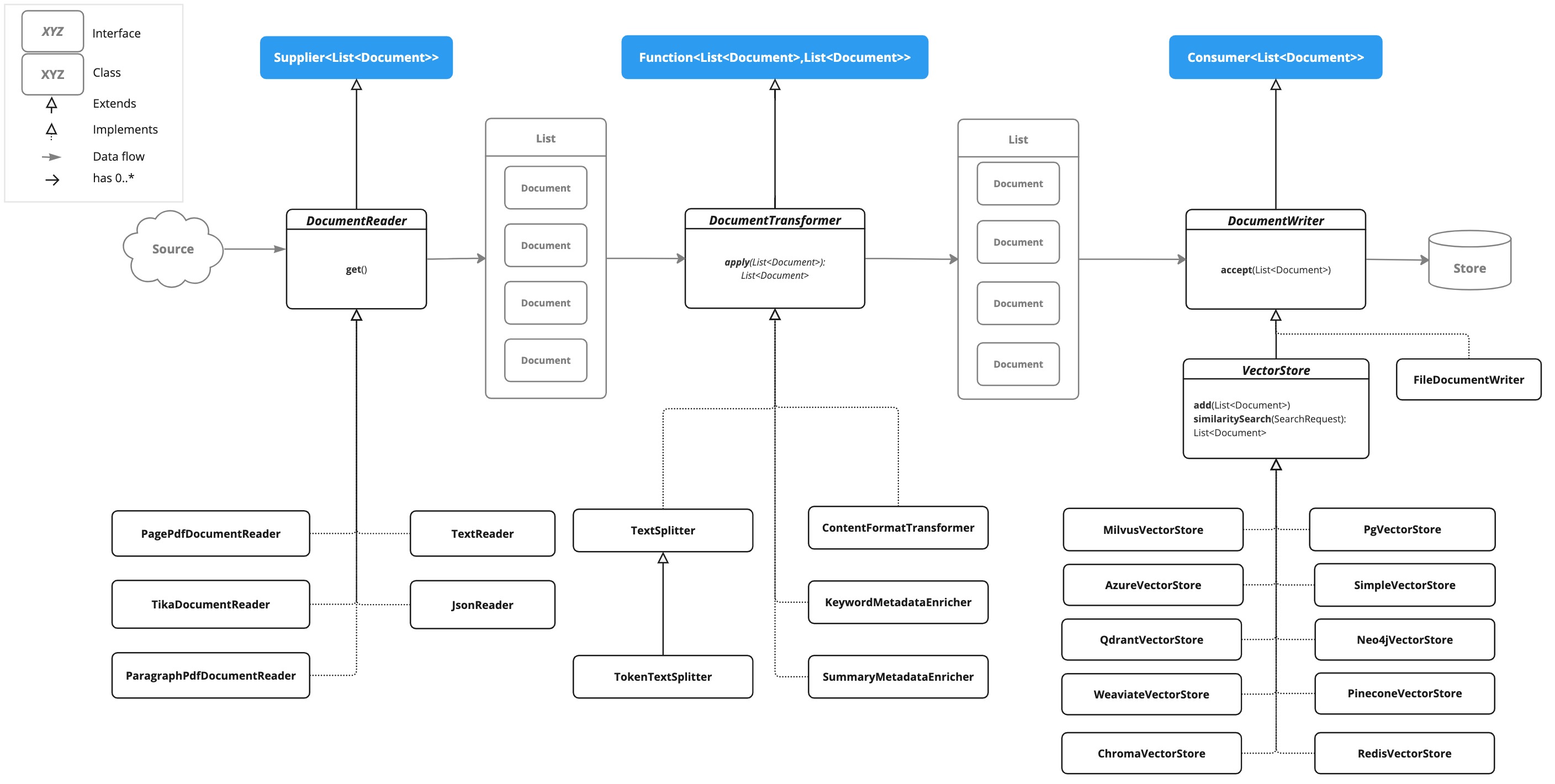
ETL 管道建立、轉換和儲存 Document 例項。

Document 類包含文字、元資料以及可選的附加媒體型別,如影像、音訊和影片。
ETL 管道有三個主要元件:
-
DocumentReader實現了Supplier<List<Document>> -
DocumentTransformer實現了Function<List<Document>, List<Document>> -
DocumentWriter實現了Consumer<List<Document>>
Document 類的內容是透過 DocumentReader 從 PDF、文字檔案和其他文件型別建立的。
要構建一個簡單的 ETL 管道,您可以將每種型別的一個例項連線起來。

假設我們有以下三個 ETL 型別的例項:
-
PagePdfDocumentReader是DocumentReader的實現 -
TokenTextSplitter是DocumentTransformer的實現 -
VectorStore是DocumentWriter的實現
要將資料基本載入到向量資料庫中以用於檢索增強生成模式,請使用 Java 函式式語法中的以下程式碼。
vectorStore.accept(tokenTextSplitter.apply(pdfReader.get()));或者,您可以使用對領域更具表達性的方法名稱
vectorStore.write(tokenTextSplitter.split(pdfReader.read()));ETL 介面
ETL 管道由以下介面和實現組成。詳細的 ETL 類圖顯示在 ETL 類圖 部分。
DocumentReader
提供來自不同來源的文件。
public interface DocumentReader extends Supplier<List<Document>> {

    default List<Document> read() {
		return get();
	}
}
DocumentTransformer
作為處理工作流的一部分,轉換一批文件。
public interface DocumentTransformer extends Function<List<Document>, List<Document>> {

    default List<Document> transform(List<Document> transform) {
		return apply(transform);
	}
}
DocumentReaders
JSON
JsonReader 處理 JSON 文件,將其轉換為 Document 物件的列表。
示例
@Component
class MyJsonReader {

	private final Resource resource;

    MyJsonReader(@Value("classpath:bikes.json") Resource resource) {
        this.resource = resource;
    }

	List<Document> loadJsonAsDocuments() {
        JsonReader jsonReader = new JsonReader(this.resource, "description", "content");
        return jsonReader.get();
	}
}
建構函式選項
JsonReader 提供了幾個建構函式選項
-
JsonReader(Resource resource) -
JsonReader(Resource resource, String… jsonKeysToUse) -
JsonReader(Resource resource, JsonMetadataGenerator jsonMetadataGenerator, String… jsonKeysToUse)
引數
-
resource:指向 JSON 檔案的 SpringResource物件。 -
jsonKeysToUse:JSON 中的鍵陣列,應將其用作生成Document物件中的文字內容。 -
jsonMetadataGenerator:一個可選的JsonMetadataGenerator,用於為每個Document建立元資料。
行為
JsonReader 按如下方式處理 JSON 內容
-
它可以處理 JSON 陣列和單個 JSON 物件。
-
對於每個 JSON 物件(無論是陣列中的還是單個物件)
-
它根據指定的
jsonKeysToUse提取內容。 -
如果未指定鍵,它將整個 JSON 物件用作內容。
-
它使用提供的
JsonMetadataGenerator(如果未提供則使用空生成器)生成元資料。 -
它使用提取的內容和元資料建立一個
Document物件。
-
使用 JSON 指標
JsonReader 現在支援使用 JSON 指標檢索 JSON 文件的特定部分。此功能允許您輕鬆地從複雜的 JSON 結構中提取巢狀資料。
示例 JSON 結構
[
  {
    "id": 1,
    "brand": "Trek",
    "description": "A high-performance mountain bike for trail riding."
  },
  {
    "id": 2,
    "brand": "Cannondale",
    "description": "An aerodynamic road bike for racing enthusiasts."
  }
]
在此示例中,如果 JsonReader 配置為將 "description" 作為 jsonKeysToUse,它將建立 Document 物件,其中內容是陣列中每輛腳踏車的 "description" 欄位的值。
文字
TextReader 處理純文字文件,將其轉換為 Document 物件的列表。
示例
@Component
class MyTextReader {

    private final Resource resource;

    MyTextReader(@Value("classpath:text-source.txt") Resource resource) {
        this.resource = resource;
    }

	List<Document> loadText() {
		TextReader textReader = new TextReader(this.resource);
		textReader.getCustomMetadata().put("filename", "text-source.txt");

		return textReader.read();
    }
}配置
-
setCharset(Charset charset):設定用於讀取文字檔案的字元集。預設為 UTF-8。 -
getCustomMetadata():返回一個可變對映,您可以在其中為文件新增自定義元資料。
行為
TextReader 按如下方式處理文字內容
-
它將文字檔案的全部內容讀入單個
Document物件。 -
檔案的內容成為
Document的內容。 -
元資料會自動新增到
Document中-
charset:用於讀取檔案的字元集(預設值:"UTF-8")。 -
source:源文字檔案的檔名。
-
-
透過
getCustomMetadata()新增的任何自定義元資料都包含在Document中。
注意
-
TextReader將整個檔案內容讀入記憶體,因此它可能不適合非常大的檔案。 -
如果您需要將文字拆分成更小的塊,您可以在讀取文件後使用文字拆分器,例如
TokenTextSplitter
List<Document> documents = textReader.get();
List<Document> splitDocuments = new TokenTextSplitter().apply(this.documents);-
讀取器使用 Spring 的
Resource抽象,允許它從各種來源(類路徑、檔案系統、URL 等)讀取。 -
可以使用
getCustomMetadata()方法將自定義元資料新增到讀取器建立的所有文件中。
HTML (JSoup)
JsoupDocumentReader 處理 HTML 文件,使用 JSoup 庫將其轉換為 Document 物件的列表。
示例
@Component
class MyHtmlReader {

    private final Resource resource;

    MyHtmlReader(@Value("classpath:/my-page.html") Resource resource) {
        this.resource = resource;
    }

    List<Document> loadHtml() {
        JsoupDocumentReaderConfig config = JsoupDocumentReaderConfig.builder()
            .selector("article p") // Extract paragraphs within <article> tags
            .charset("ISO-8859-1")  // Use ISO-8859-1 encoding
            .includeLinkUrls(true) // Include link URLs in metadata
            .metadataTags(List.of("author", "date")) // Extract author and date meta tags
            .additionalMetadata("source", "my-page.html") // Add custom metadata
            .build();

        JsoupDocumentReader reader = new JsoupDocumentReader(this.resource, config);
        return reader.get();
    }
}
JsoupDocumentReaderConfig 允許您自定義 JsoupDocumentReader 的行為
-
charset:指定 HTML 文件的字元編碼(預設為 "UTF-8")。 -
selector:一個 JSoup CSS 選擇器,用於指定從哪些元素中提取文字(預設為 "body")。 -
separator:用於連線來自多個選定元素的文字的字串(預設為 "\n")。 -
allElements:如果為true,則從<body>元素中提取所有文字,忽略selector(預設為false)。 -
groupByElement:如果為true,則為selector匹配的每個元素建立一個單獨的Document(預設為false)。 -
includeLinkUrls:如果為true,則提取絕對連結 URL 並將其新增到元資料中(預設為false)。 -
metadataTags:要提取內容的<meta>標籤名稱列表(預設為["description", "keywords"])。 -
additionalMetadata:允許您向所有建立的Document物件新增自定義元資料。
示例文件:my-page.html
<!DOCTYPE html>
<html lang="en">
<head>
<meta charset="UTF-8">
<title>My Web Page</title>
<meta name="description" content="A sample web page for Spring AI">
<meta name="keywords" content="spring, ai, html, example">
<meta name="author" content="John Doe">
<meta name="date" content="2024-01-15">
<link rel="stylesheet" href="style.css">
</head>
<body>
<header>
<h1>Welcome to My Page</h1>
</header>
<nav>
<ul>
<li><a href="/">Home</a></li>
<li><a href="/about">About</a></li>
</ul>
</nav>
<article>
<h2>Main Content</h2>
<p>This is the main content of my web page.</p>
<p>It contains multiple paragraphs.</p>
<a href="https://www.example.com">External Link</a>
</article>
<footer>
<p>© 2024 John Doe</p>
</footer>
</body>
</html>行為
JsoupDocumentReader 處理 HTML 內容並根據配置建立 Document 物件
-
selector確定用於文字提取的元素。 -
如果
allElements為true,則<body>中的所有文字都提取到單個Document中。 -
如果
groupByElement為true,則與selector匹配的每個元素都會建立一個單獨的Document。 -
如果
allElements和groupByElement都不是true,則將所有與selector匹配的元素的文字使用separator連線起來。 -
文件標題、從指定
<meta>標籤中提取的內容以及(可選)連結 URL 將新增到Document元資料中。 -
基本 URI,用於解析相對連結,將從 URL 資源中提取。
讀取器保留選定元素的文字內容,但會刪除其中的任何 HTML 標籤。
Markdown
MarkdownDocumentReader 處理 Markdown 文件,將其轉換為 Document 物件的列表。
示例
@Component
class MyMarkdownReader {

    private final Resource resource;

    MyMarkdownReader(@Value("classpath:code.md") Resource resource) {
        this.resource = resource;
    }

    List<Document> loadMarkdown() {
        MarkdownDocumentReaderConfig config = MarkdownDocumentReaderConfig.builder()
            .withHorizontalRuleCreateDocument(true)
            .withIncludeCodeBlock(false)
            .withIncludeBlockquote(false)
            .withAdditionalMetadata("filename", "code.md")
            .build();

        MarkdownDocumentReader reader = new MarkdownDocumentReader(this.resource, config);
        return reader.get();
    }
}
MarkdownDocumentReaderConfig 允許您自定義 MarkdownDocumentReader 的行為
-
horizontalRuleCreateDocument:設定為true時,Markdown 中的水平線將建立新的Document物件。 -
includeCodeBlock:設定為true時,程式碼塊將包含在與周圍文字相同的Document中。設定為false時,程式碼塊會建立單獨的Document物件。 -
includeBlockquote:設定為true時,引用塊將包含在與周圍文字相同的Document中。設定為false時,引用塊會建立單獨的Document物件。 -
additionalMetadata:允許您向所有建立的Document物件新增自定義元資料。
示例文件:code.md
This is a Java sample application:

```java
package com.example.demo;

import org.springframework.boot.SpringApplication;
import org.springframework.boot.autoconfigure.SpringBootApplication;

@SpringBootApplication
public class DemoApplication {
    public static void main(String[] args) {
        SpringApplication.run(DemoApplication.class, args);
    }
}
```

Markdown also provides the possibility to `use inline code formatting throughout` the entire sentence.

---

Another possibility is to set block code without specific highlighting:

```
./mvnw spring-javaformat:apply
```
行為:MarkdownDocumentReader 處理 Markdown 內容並根據配置建立 Document 物件
-
標題成為 Document 物件中的元資料。
-
段落成為 Document 物件的內容。
-
程式碼塊可以分離到自己的 Document 物件中,也可以與周圍文字一起包含。
-
引用塊可以分離到自己的 Document 物件中,也可以與周圍文字一起包含。
-
水平線可用於將內容拆分為單獨的 Document 物件。
讀取器保留 Document 物件內容中的行內程式碼、列表和文字樣式等格式。
PDF 頁面
PagePdfDocumentReader 使用 Apache PdfBox 庫解析 PDF 文件
使用 Maven 或 Gradle 將依賴項新增到您的專案中。
<dependency>
    <groupId>org.springframework.ai</groupId>
    <artifactId>spring-ai-pdf-document-reader</artifactId>
</dependency>
或新增到您的 Gradle build.gradle 構建檔案中。
dependencies {
    implementation 'org.springframework.ai:spring-ai-pdf-document-reader'
}
示例
@Component
public class MyPagePdfDocumentReader {

	List<Document> getDocsFromPdf() {

		PagePdfDocumentReader pdfReader = new PagePdfDocumentReader("classpath:/sample1.pdf",
				PdfDocumentReaderConfig.builder()
					.withPageTopMargin(0)
					.withPageExtractedTextFormatter(ExtractedTextFormatter.builder()
						.withNumberOfTopTextLinesToDelete(0)
						.build())
					.withPagesPerDocument(1)
					.build());

		return pdfReader.read();
    }

}
PDF 段落
ParagraphPdfDocumentReader 使用 PDF 目錄(例如 TOC)資訊將輸入 PDF 拆分為文字段落,併為每個段落輸出一個 Document。注意:並非所有 PDF 文件都包含 PDF 目錄。
依賴關係
使用 Maven 或 Gradle 將依賴項新增到您的專案中。
<dependency>
    <groupId>org.springframework.ai</groupId>
    <artifactId>spring-ai-pdf-document-reader</artifactId>
</dependency>
或新增到您的 Gradle build.gradle 構建檔案中。
dependencies {
    implementation 'org.springframework.ai:spring-ai-pdf-document-reader'
}
示例
@Component
public class MyPagePdfDocumentReader {

	List<Document> getDocsFromPdfWithCatalog() {

        ParagraphPdfDocumentReader pdfReader = new ParagraphPdfDocumentReader("classpath:/sample1.pdf",
                PdfDocumentReaderConfig.builder()
                    .withPageTopMargin(0)
                    .withPageExtractedTextFormatter(ExtractedTextFormatter.builder()
                        .withNumberOfTopTextLinesToDelete(0)
                        .build())
                    .withPagesPerDocument(1)
                    .build());

	    return pdfReader.read();
    }
}
Tika (DOCX, PPTX, HTML…)
TikaDocumentReader 使用 Apache Tika 從各種文件格式(例如 PDF、DOC/DOCX、PPT/PPTX 和 HTML)中提取文字。有關支援格式的完整列表,請參閱 Tika 文件。
依賴關係
<dependency>
    <groupId>org.springframework.ai</groupId>
    <artifactId>spring-ai-tika-document-reader</artifactId>
</dependency>
或新增到您的 Gradle build.gradle 構建檔案中。
dependencies {
    implementation 'org.springframework.ai:spring-ai-tika-document-reader'
}
示例
@Component
class MyTikaDocumentReader {

    private final Resource resource;

    MyTikaDocumentReader(@Value("classpath:/word-sample.docx")
                            Resource resource) {
        this.resource = resource;
    }

    List<Document> loadText() {
        TikaDocumentReader tikaDocumentReader = new TikaDocumentReader(this.resource);
        return tikaDocumentReader.read();
    }
}
轉換器
TokenTextSplitter
TokenTextSplitter 是 TextSplitter 的一個實現,它使用 CL100K_BASE 編碼根據令牌計數將文字分割成塊。
用法
@Component
class MyTokenTextSplitter {

    public List<Document> splitDocuments(List<Document> documents) {
        TokenTextSplitter splitter = new TokenTextSplitter();
        return splitter.apply(documents);
    }

    public List<Document> splitCustomized(List<Document> documents) {
        TokenTextSplitter splitter = new TokenTextSplitter(1000, 400, 10, 5000, true);
        return splitter.apply(documents);
    }
}
建構函式選項
TokenTextSplitter 提供兩個建構函式選項
-
TokenTextSplitter():使用預設設定建立拆分器。 -
TokenTextSplitter(int defaultChunkSize, int minChunkSizeChars, int minChunkLengthToEmbed, int maxNumChunks, boolean keepSeparator)
引數
-
defaultChunkSize:每個文字塊的令牌目標大小(預設值:800)。 -
minChunkSizeChars:每個文字塊的最小字元大小(預設值:350)。 -
minChunkLengthToEmbed:要包含的塊的最小長度(預設值:5)。 -
maxNumChunks:從文字生成的最大塊數(預設值:10000)。 -
keepSeparator:是否在塊中保留分隔符(如換行符)(預設值:true)。
行為
TokenTextSplitter 按如下方式處理文字內容
-
它使用 CL100K_BASE 編碼將輸入文字編碼為令牌。
-
它根據
defaultChunkSize將編碼文字分割成塊。 -
對於每個塊
-
它將塊解碼迴文本。
-
它嘗試在
minChunkSizeChars之後找到合適的斷點(句號、問號、感嘆號或換行符)。 -
如果找到斷點,它會在該點截斷塊。
-
它根據
keepSeparator設定修剪塊並可選地刪除換行符。 -
如果生成的塊長於
minChunkLengthToEmbed,則將其新增到輸出中。
-
-
此過程一直持續到所有令牌都處理完畢或達到
maxNumChunks。 -
任何剩餘文字如果長於
minChunkLengthToEmbed,則作為最後一個塊新增。
示例
Document doc1 = new Document("This is a long piece of text that needs to be split into smaller chunks for processing.",
        Map.of("source", "example.txt"));
Document doc2 = new Document("Another document with content that will be split based on token count.",
        Map.of("source", "example2.txt"));

TokenTextSplitter splitter = new TokenTextSplitter();
List<Document> splitDocuments = this.splitter.apply(List.of(this.doc1, this.doc2));

for (Document doc : splitDocuments) {
    System.out.println("Chunk: " + doc.getContent());
    System.out.println("Metadata: " + doc.getMetadata());
}KeywordMetadataEnricher
KeywordMetadataEnricher 是一個 DocumentTransformer,它使用生成式 AI 模型從文件內容中提取關鍵字並將其新增為元資料。
用法
@Component
class MyKeywordEnricher {

    private final ChatModel chatModel;

    MyKeywordEnricher(ChatModel chatModel) {
        this.chatModel = chatModel;
    }

    List<Document> enrichDocuments(List<Document> documents) {
        KeywordMetadataEnricher enricher = KeywordMetadataEnricher.builder(chatModel)
                .keywordCount(5)
                .build();

        // Or use custom templates
        KeywordMetadataEnricher enricher = KeywordMetadataEnricher.builder(chatModel)
               .keywordsTemplate(YOUR_CUSTOM_TEMPLATE)
               .build();

        return enricher.apply(documents);
    }
}
建構函式選項
KeywordMetadataEnricher 提供兩個建構函式選項
-
KeywordMetadataEnricher(ChatModel chatModel, int keywordCount):使用預設模板並提取指定數量的關鍵字。 -
KeywordMetadataEnricher(ChatModel chatModel, PromptTemplate keywordsTemplate):使用自定義模板進行關鍵字提取。
行為
KeywordMetadataEnricher 按如下方式處理文件
-
對於每個輸入文件,它使用文件內容建立一個提示。
-
它將此提示傳送到提供的
ChatModel以生成關鍵字。 -
生成的關鍵字將以 "excerpt_keywords" 鍵新增到文件的元資料中。
-
返回經過富集的文件。
自定義
您可以使用預設模板,也可以透過 keywordsTemplate 引數自定義模板。預設模板是
\{context_str}. Give %s unique keywords for this document. Format as comma separated. Keywords:其中 {context_str} 被文件內容替換,%s 被指定的關鍵字計數替換。
示例
ChatModel chatModel = // initialize your chat model
KeywordMetadataEnricher enricher = KeywordMetadataEnricher.builder(chatModel)
                .keywordCount(5)
                .build();

// Or use custom templates
KeywordMetadataEnricher enricher = KeywordMetadataEnricher.builder(chatModel)
                .keywordsTemplate(new PromptTemplate("Extract 5 important keywords from the following text and separate them with commas:\n{context_str}"))
                .build();

Document doc = new Document("This is a document about artificial intelligence and its applications in modern technology.");

List<Document> enrichedDocs = enricher.apply(List.of(this.doc));

Document enrichedDoc = this.enrichedDocs.get(0);
String keywords = (String) this.enrichedDoc.getMetadata().get("excerpt_keywords");
System.out.println("Extracted keywords: " + keywords);SummaryMetadataEnricher
SummaryMetadataEnricher 是一個 DocumentTransformer,它使用生成式 AI 模型為文件建立摘要並將其新增為元資料。它可以為當前文件以及相鄰文件(上一文件和下一文件)生成摘要。
用法
@Configuration
class EnricherConfig {

    @Bean
    public SummaryMetadataEnricher summaryMetadata(OpenAiChatModel aiClient) {
        return new SummaryMetadataEnricher(aiClient,
            List.of(SummaryType.PREVIOUS, SummaryType.CURRENT, SummaryType.NEXT));
    }
}

@Component
class MySummaryEnricher {

    private final SummaryMetadataEnricher enricher;

    MySummaryEnricher(SummaryMetadataEnricher enricher) {
        this.enricher = enricher;
    }

    List<Document> enrichDocuments(List<Document> documents) {
        return this.enricher.apply(documents);
    }
}
建構函式
SummaryMetadataEnricher 提供兩個建構函式
-
SummaryMetadataEnricher(ChatModel chatModel, List<SummaryType> summaryTypes) -
SummaryMetadataEnricher(ChatModel chatModel, List<SummaryType> summaryTypes, String summaryTemplate, MetadataMode metadataMode)
引數
-
chatModel:用於生成摘要的 AI 模型。 -
summaryTypes:一個SummaryType列舉值列表,指示要生成哪些摘要(PREVIOUS、CURRENT、NEXT)。 -
summaryTemplate:用於摘要生成的自定義模板(可選)。 -
metadataMode:指定在生成摘要時如何處理文件元資料(可選)。
行為
SummaryMetadataEnricher 按如下方式處理文件
-
對於每個輸入文件,它使用文件內容和指定的摘要模板建立一個提示。
-
它將此提示傳送到提供的
ChatModel以生成摘要。 -
根據指定的
summaryTypes,它會向每個文件新增以下元資料-
section_summary:當前文件的摘要。 -
prev_section_summary:上一文件的摘要(如果可用且已請求)。 -
next_section_summary:下一文件的摘要(如果可用且已請求)。
-
-
返回經過富集的文件。
自定義
摘要生成提示可以透過提供自定義 summaryTemplate 來定製。預設模板是
"""
Here is the content of the section:
{context_str}

Summarize the key topics and entities of the section.

Summary:
"""
示例
ChatModel chatModel = // initialize your chat model
SummaryMetadataEnricher enricher = new SummaryMetadataEnricher(chatModel,
    List.of(SummaryType.PREVIOUS, SummaryType.CURRENT, SummaryType.NEXT));

Document doc1 = new Document("Content of document 1");
Document doc2 = new Document("Content of document 2");

List<Document> enrichedDocs = enricher.apply(List.of(this.doc1, this.doc2));

// Check the metadata of the enriched documents
for (Document doc : enrichedDocs) {
    System.out.println("Current summary: " + doc.getMetadata().get("section_summary"));
    System.out.println("Previous summary: " + doc.getMetadata().get("prev_section_summary"));
    System.out.println("Next summary: " + doc.getMetadata().get("next_section_summary"));
}
提供的示例演示了預期行為
-
對於兩個文件的列表,兩個文件都收到
section_summary。 -
第一個文件收到
next_section_summary,但沒有prev_section_summary。 -
第二個文件收到
prev_section_summary,但沒有next_section_summary。 -
第一個文件的
section_summary與第二個文件的prev_section_summary匹配。 -
第一個文件的
next_section_summary與第二個文件的section_summary匹配。
寫入器
檔案
FileDocumentWriter 是 DocumentWriter 的實現,它將 Document 物件列表的內容寫入檔案。
用法
@Component
class MyDocumentWriter {

    public void writeDocuments(List<Document> documents) {
        FileDocumentWriter writer = new FileDocumentWriter("output.txt", true, MetadataMode.ALL, false);
        writer.accept(documents);
    }
}
建構函式
FileDocumentWriter 提供三個建構函式
-
FileDocumentWriter(String fileName) -
FileDocumentWriter(String fileName, boolean withDocumentMarkers) -
FileDocumentWriter(String fileName, boolean withDocumentMarkers, MetadataMode metadataMode, boolean append)
引數
-
fileName:要寫入文件的檔名。 -
withDocumentMarkers:是否在輸出中包含文件標記(預設值:false)。 -
metadataMode:指定要寫入檔案的文件內容(預設值:MetadataMode.NONE)。 -
append:如果為 true,資料將寫入檔案末尾而不是開頭(預設值:false)。
行為
FileDocumentWriter 按如下方式處理文件
-
它為指定的檔名開啟一個 FileWriter。
-
對於輸入列表中的每個文件
-
如果
withDocumentMarkers為 true,它會寫入包含文件索引和頁碼的文件標記。 -
它根據指定的
metadataMode寫入文件的格式化內容。
-
-
寫入所有文件後,檔案將關閉。
文件標記
當 withDocumentMarkers 設定為 true 時,寫入器會為每個文件包含以下格式的標記
### Doc: [index], pages:[start_page_number,end_page_number]向量儲存
提供與各種向量儲存的整合。有關完整列表,請參閱 向量資料庫文件。

