Anthropic Chat
Anthropic Claude 是一個基礎 AI 模型家族,可用於各種應用。對於開發者和企業,您可以利用 API 訪問直接在 Anthropic 的 AI 基礎設施之上構建應用。
Spring AI 支援 Anthropic Messaging API,用於同步和流式文字生成。
| Anthropic 的 Claude 模型也可以透過 Amazon Bedrock Converse 獲得。Spring AI 也提供了專門的 Amazon Bedrock Converse Anthropic 客戶端實現。 |
先決條件
您需要在 Anthropic 門戶上建立一個 API 金鑰。
在 Anthropic API 控制檯 建立一個帳戶,並在 獲取 API 金鑰 頁面生成 API 金鑰。
Spring AI 專案定義了一個名為 spring.ai.anthropic.api-key 的配置屬性,您應該將其設定為從 anthropic.com 獲取的 API 金鑰 值。
您可以在 application.properties 檔案中設定此配置屬性
spring.ai.anthropic.api-key=<your-anthropic-api-key>為了在處理敏感資訊(如 API 金鑰)時增強安全性,您可以使用 Spring Expression Language (SpEL) 引用自定義環境變數
# In application.yml
spring:
  ai:
    anthropic:
      api-key: ${ANTHROPIC_API_KEY}
# In your environment or .env file
export ANTHROPIC_API_KEY=<your-anthropic-api-key>您也可以在應用程式程式碼中以程式設計方式獲取此配置
// Retrieve API key from a secure source or environment variable
String apiKey = System.getenv("ANTHROPIC_API_KEY");自動配置
|
Spring AI 自動配置、啟動模組的工件名稱發生了重大變化。請參閱 升級說明 以獲取更多資訊。 |
Spring AI 為 Anthropic Chat 客戶端提供了 Spring Boot 自動配置。要啟用它,請將以下依賴項新增到專案的 Maven pom.xml 或 Gradle build.gradle 檔案中
-
Maven
-
Gradle
<dependency>
    <groupId>org.springframework.ai</groupId>
    <artifactId>spring-ai-starter-model-anthropic</artifactId>
</dependency>
dependencies {
implementation 'org.springframework.ai:spring-ai-starter-model-anthropic'
}| 請參閱 依賴項管理 部分,將 Spring AI BOM 新增到您的構建檔案中。 |
聊天屬性
重試屬性
字首 spring.ai.retry 用作屬性字首,可讓您配置 Anthropic 聊天模型的重試機制。
| 財產 | 描述 | 預設值 |
|---|---|---|
spring.ai.retry.max-attempts |
最大重試次數。 |
10 |
spring.ai.retry.backoff.initial-interval |
指數回退策略的初始休眠時間。 |
2 秒。 |
spring.ai.retry.backoff.multiplier |
回退間隔乘數。 |
5 |
spring.ai.retry.backoff.max-interval |
最大回退持續時間。 |
3 分鐘。 |
spring.ai.retry.on-client-errors |
如果為 false,則丟擲 NonTransientAiException,並且不嘗試重試 |
假 |
spring.ai.retry.exclude-on-http-codes |
不應觸發重試的 HTTP 狀態程式碼列表(例如,丟擲 NonTransientAiException)。 |
空 |
spring.ai.retry.on-http-codes |
應觸發重試的 HTTP 狀態程式碼列表(例如,丟擲 TransientAiException)。 |
空 |
| 目前,重試策略不適用於流式 API。 |
連線屬性
字首 spring.ai.anthropic 用作屬性字首,可讓您連線到 Anthropic。
| 財產 | 描述 | 預設值 |
|---|---|---|
spring.ai.anthropic.base-url |
要連線的 URL |
|
spring.ai.anthropic.completions-path |
要附加到基本 URL 的路徑。 |
|
spring.ai.anthropic.version |
Anthropic API 版本 |
2023-06-01 |
spring.ai.anthropic.api-key |
API 金鑰 |
- |
spring.ai.anthropic.beta-version |
啟用新/實驗性功能。如果設定為 |
|
配置屬性
|
聊天自動配置的啟用和停用現在透過以 要啟用,請設定 spring.ai.model.chat=anthropic(預設已啟用) 要停用,請設定 spring.ai.model.chat=none(或任何與 anthropic 不匹配的值) 此更改是為了允許配置多個模型。 |
字首 spring.ai.anthropic.chat 是屬性字首,用於配置 Anthropic 的聊天模型實現。
| 財產 | 描述 | 預設值 |
|---|---|---|
spring.ai.anthropic.chat.enabled (已移除且不再有效) |
啟用 Anthropic 聊天模型。 |
true |
spring.ai.model.chat |
啟用 Anthropic 聊天模型。 |
anthropic |
spring.ai.anthropic.chat.options.model |
這是要使用的 Anthropic Chat 模型。支援: |
|
spring.ai.anthropic.chat.options.temperature |
用於控制生成完成的明顯創造性的取樣溫度。較高的值將使輸出更隨機,而較低的值將使結果更集中和確定。不建議在同一完成請求中修改溫度和 top_p,因為這兩個設定的相互作用難以預測。 |
0.8 |
spring.ai.anthropic.chat.options.max-tokens |
在聊天完成中生成的最大令牌數。輸入令牌和生成令牌的總長度受模型的上下文長度限制。 |
500 |
spring.ai.anthropic.chat.options.stop-sequence |
自定義文字序列,將導致模型停止生成。我們的模型通常會在自然完成其回合時停止,這將導致響應 stop_reason 為 "end_turn"。如果您希望模型在遇到自定義字串時停止生成,可以使用 stop_sequences 引數。如果模型遇到其中一個自定義序列,則響應 stop_reason 值為 "stop_sequence",響應 stop_sequence 值將包含匹配的停止序列。 |
- |
spring.ai.anthropic.chat.options.top-p |
使用核取樣。在核取樣中,我們以遞減的機率順序計算每個後續令牌的所有選項的累積分佈,並在達到 top_p 指定的特定機率時將其截斷。您應該修改 temperature 或 top_p,但不要同時修改兩者。僅推薦用於高階用例。您通常只需要使用 temperature。 |
- |
spring.ai.anthropic.chat.options.top-k |
僅從每個後續令牌的前 K 個選項中取樣。用於刪除“長尾”低機率響應。在此處瞭解更多技術細節。僅推薦用於高階用例。您通常只需要使用 temperature。 |
- |
spring.ai.anthropic.chat.options.tool-names |
工具列表,透過其名稱標識,用於在單個提示請求中啟用工具呼叫。具有這些名稱的工具必須存在於 toolCallbacks 登錄檔中。 |
- |
spring.ai.anthropic.chat.options.tool-callbacks |
要註冊到 ChatModel 的工具回撥。 |
- |
spring.ai.anthropic.chat.options.toolChoice |
控制模型呼叫哪個(如果有)工具。 |
- |
spring.ai.anthropic.chat.options.internal-tool-execution-enabled |
如果為 false,Spring AI 將不會在內部處理工具呼叫,而是將其代理到客戶端。然後,客戶端負責處理工具呼叫,將其分派到適當的函式,並返回結果。如果為 true(預設),Spring AI 將在內部處理函式呼叫。僅適用於支援函式呼叫的聊天模型 |
true |
spring.ai.anthropic.chat.options.http-headers |
要新增到聊天完成請求的可選 HTTP 標頭。 |
- |
| 有關模型別名及其描述的最新列表,請參閱 Anthropic 官方模型別名文件。 |
所有以 spring.ai.anthropic.chat.options 為字首的屬性都可以在執行時透過向 Prompt 呼叫新增請求特定的 執行時選項 來覆蓋。 |
執行時選項
AnthropicChatOptions.java 提供了模型配置,例如要使用的模型、溫度、最大令牌計數等。
在啟動時,可以使用 AnthropicChatModel(api, options) 建構函式或 spring.ai.anthropic.chat.options.* 屬性配置預設選項。
在執行時,您可以透過向 Prompt 呼叫新增新的、請求特定的選項來覆蓋預設選項。例如,為特定請求覆蓋預設模型和溫度
ChatResponse response = chatModel.call(
    new Prompt(
        "Generate the names of 5 famous pirates.",
        AnthropicChatOptions.builder()
            .model("claude-3-7-sonnet-latest")
            .temperature(0.4)
        .build()
));| 除了特定於模型的 AnthropicChatOptions 之外,您還可以使用透過 ChatOptions#builder() 建立的可移植 ChatOptions 例項。 |
提示快取
Anthropic 的 提示快取功能 允許您快取常用提示,以降低成本並縮短重複互動的響應時間。當您快取一個提示時,後續相同的請求可以重用快取的內容,從而顯著減少處理的輸入令牌數量。
|
支援的模型 提示快取目前支援 Claude Opus 4、Claude Sonnet 4、Claude Sonnet 3.7、Claude Sonnet 3.5、Claude Haiku 3.5、Claude Haiku 3 和 Claude Opus 3。 令牌要求 不同的模型對快取效率有不同的最小令牌閾值:- Claude Sonnet 4:1024+ 令牌 - Claude Haiku 模型:2048+ 令牌 - 其他模型:1024+ 令牌 |
快取策略
Spring AI 透過 AnthropicCacheStrategy 列舉提供戰略性快取放置。每個策略都會自動在最佳位置放置快取斷點,同時保持在 Anthropic 的 4 個斷點限制內。
| 策略 | 使用的斷點 | 用例 |
|---|---|---|
|
0 |
完全停用提示快取。當請求是一次性的或內容太小無法從快取中受益時使用。 |
|
1 |
快取系統訊息內容。工具透過 Anthropic 的自動 ~20 塊回溯機制隱式快取。當系統提示很大且穩定,且工具少於 20 個時使用。 |
|
1 |
僅快取工具定義。系統訊息保持未快取狀態,並在每次請求時重新處理。當工具定義很大且穩定(5000+ 令牌),但系統提示頻繁更改或根據租戶/上下文而異時使用。 |
|
2 |
明確快取工具定義(斷點 1)和系統訊息(斷點 2)。當您有 20 多個工具(超出自動回溯)或希望對這兩個元件進行確定性快取時使用。系統更改不會使工具快取失效。 |
|
1-4 |
快取直至當前使用者問題的所有對話歷史記錄。用於具有聊天記憶的多輪對話,其中對話歷史記錄隨時間增長。 |
由於 Anthropic 的級聯失效,更改工具定義將使所有下游快取斷點(系統、訊息)失效。當使用 SYSTEM_AND_TOOLS 或 CONVERSATION_HISTORY 策略時,工具的穩定性至關重要。 |
啟用提示快取
透過在 AnthropicChatOptions 上設定 cacheOptions 並選擇 strategy 來啟用提示快取。
僅系統快取
最適合:穩定的系統提示,工具少於 20 個(工具透過自動回溯隱式快取)。
// Cache system message content (tools cached implicitly)
ChatResponse response = chatModel.call(
    new Prompt(
        List.of(
            new SystemMessage("You are a helpful AI assistant with extensive knowledge..."),
            new UserMessage("What is machine learning?")
        ),
        AnthropicChatOptions.builder()
            .model("claude-sonnet-4")
            .cacheOptions(AnthropicCacheOptions.builder()
                .strategy(AnthropicCacheStrategy.SYSTEM_ONLY)
                .build())
            .maxTokens(500)
            .build()
    )
);
僅工具快取
最適合:大型穩定工具集與動態系統提示(多租戶應用,A/B 測試)。
// Cache tool definitions, system prompt processed fresh each time
ChatResponse response = chatModel.call(
    new Prompt(
        List.of(
            new SystemMessage("You are a " + persona + " assistant..."), // Dynamic per-tenant
            new UserMessage("What's the weather like in San Francisco?")
        ),
        AnthropicChatOptions.builder()
            .model("claude-sonnet-4")
            .cacheOptions(AnthropicCacheOptions.builder()
                .strategy(AnthropicCacheStrategy.TOOLS_ONLY)
                .build())
            .toolCallbacks(weatherToolCallback) // Large tool set cached
            .maxTokens(500)
            .build()
    )
);
系統和工具快取
最適合:20 多個工具(超出自動回溯)或當兩個元件都應獨立快取時。
// Cache both tool definitions and system message with independent breakpoints
// Changing system won't invalidate tool cache (but changing tools invalidates both)
ChatResponse response = chatModel.call(
    new Prompt(
        List.of(
            new SystemMessage("You are a weather analysis assistant..."),
            new UserMessage("What's the weather like in San Francisco?")
        ),
        AnthropicChatOptions.builder()
            .model("claude-sonnet-4")
            .cacheOptions(AnthropicCacheOptions.builder()
                .strategy(AnthropicCacheStrategy.SYSTEM_AND_TOOLS)
                .build())
            .toolCallbacks(weatherToolCallback) // 20+ tools
            .maxTokens(500)
            .build()
    )
);
對話歷史快取
// Cache conversation history with ChatClient and memory (cache breakpoint on last user message)
ChatClient chatClient = ChatClient.builder(chatModel)
    .defaultSystem("You are a personalized career counselor...")
    .defaultAdvisors(MessageChatMemoryAdvisor.builder(chatMemory)
        .conversationId(conversationId)
        .build())
    .build();

String response = chatClient.prompt()
    .user("What career advice would you give me?")
    .options(AnthropicChatOptions.builder()
        .model("claude-sonnet-4")
        .cacheOptions(AnthropicCacheOptions.builder()
            .strategy(AnthropicCacheStrategy.CONVERSATION_HISTORY)
            .build())
        .maxTokens(500)
        .build())
    .call()
    .content();
使用 ChatClient Fluent API
String response = ChatClient.create(chatModel)
    .prompt()
    .system("You are an expert document analyst...")
    .user("Analyze this large document: " + document)
    .options(AnthropicChatOptions.builder()
        .model("claude-sonnet-4")
        .cacheOptions(AnthropicCacheOptions.builder()
            .strategy(AnthropicCacheStrategy.SYSTEM_ONLY)
            .build())
        .build())
    .call()
    .content();
高階快取選項
每訊息 TTL(5 分鐘或 1 小時)
預設情況下,快取內容使用 5 分鐘的 TTL。您可以為特定訊息型別設定 1 小時的 TTL。當使用 1 小時 TTL 時,Spring AI 會自動設定所需的 Anthropic beta 標頭。
ChatResponse response = chatModel.call(
    new Prompt(
        List.of(new SystemMessage(largeSystemPrompt)),
        AnthropicChatOptions.builder()
            .model("claude-sonnet-4")
            .cacheOptions(AnthropicCacheOptions.builder()
                .strategy(AnthropicCacheStrategy.SYSTEM_ONLY)
                .messageTypeTtl(MessageType.SYSTEM, AnthropicCacheTtl.ONE_HOUR)
                .build())
            .maxTokens(500)
            .build()
    )
);
擴充套件 TTL 使用 Anthropic beta 功能 extended-cache-ttl-2025-04-11。 |
快取資格過濾器
透過設定最小內容長度和可選的基於令牌的長度函式來控制何時使用快取斷點
AnthropicCacheOptions cache = AnthropicCacheOptions.builder()
    .strategy(AnthropicCacheStrategy.CONVERSATION_HISTORY)
    .messageTypeMinContentLength(MessageType.SYSTEM, 1024)
    .messageTypeMinContentLength(MessageType.USER, 1024)
    .messageTypeMinContentLength(MessageType.ASSISTANT, 1024)
    .contentLengthFunction(text -> MyTokenCounter.count(text))
    .build();

ChatResponse response = chatModel.call(
    new Prompt(
        List.of(/* messages */),
        AnthropicChatOptions.builder()
            .model("claude-sonnet-4")
            .cacheOptions(cache)
            .build()
    )
);
如果使用 SYSTEM_AND_TOOLS 策略,無論內容長度如何,工具定義始終被考慮進行快取。 |
使用示例
這是一個演示提示快取和成本跟蹤的完整示例
// Create system content that will be reused multiple times
String largeSystemPrompt = "You are an expert software architect specializing in distributed systems...";

// First request - creates cache
ChatResponse firstResponse = chatModel.call(
    new Prompt(
        List.of(
            new SystemMessage(largeSystemPrompt),
            new UserMessage("What is microservices architecture?")
        ),
        AnthropicChatOptions.builder()
            .model("claude-sonnet-4")
            .cacheOptions(AnthropicCacheOptions.builder()
                .strategy(AnthropicCacheStrategy.SYSTEM_ONLY)
                .build())
            .maxTokens(500)
            .build()
    )
);

// Access cache-related token usage
AnthropicApi.Usage firstUsage = (AnthropicApi.Usage) firstResponse.getMetadata()
    .getUsage().getNativeUsage();

System.out.println("Cache creation tokens: " + firstUsage.cacheCreationInputTokens());
System.out.println("Cache read tokens: " + firstUsage.cacheReadInputTokens());

// Second request with same system prompt - reads from cache
ChatResponse secondResponse = chatModel.call(
    new Prompt(
        List.of(
            new SystemMessage(largeSystemPrompt),
            new UserMessage("What are the benefits of event sourcing?")
        ),
        AnthropicChatOptions.builder()
            .model("claude-sonnet-4")
            .cacheOptions(AnthropicCacheOptions.builder()
                .strategy(AnthropicCacheStrategy.SYSTEM_ONLY)
                .build())
            .maxTokens(500)
            .build()
    )
);

AnthropicApi.Usage secondUsage = (AnthropicApi.Usage) secondResponse.getMetadata()
    .getUsage().getNativeUsage();

System.out.println("Cache creation tokens: " + secondUsage.cacheCreationInputTokens()); // Should be 0
System.out.println("Cache read tokens: " + secondUsage.cacheReadInputTokens()); // Should be > 0
令牌使用跟蹤
Usage 記錄提供了有關快取相關令牌消耗的詳細資訊。要訪問 Anthropic 特定的快取指標,請使用 getNativeUsage() 方法
AnthropicApi.Usage usage = (AnthropicApi.Usage) response.getMetadata()
    .getUsage().getNativeUsage();
快取特定指標包括
-
cacheCreationInputTokens():返回建立快取條目時使用的令牌數 -
cacheReadInputTokens():返回從現有快取條目讀取的令牌數
當您首次傳送快取的提示時:- cacheCreationInputTokens() 將大於 0 - cacheReadInputTokens() 將為 0
當您再次傳送相同的快取提示時:- cacheCreationInputTokens() 將為 0 - cacheReadInputTokens() 將大於 0
實際用例
法律檔案分析
透過在多個問題中快取文件內容,高效分析大型法律合同或合規文件
// Load a legal contract (PDF or text)
String legalContract = loadDocument("merger-agreement.pdf"); // ~3000 tokens

// System prompt with legal expertise
String legalSystemPrompt = "You are an expert legal analyst specializing in corporate law. " +
    "Analyze the following contract and provide precise answers about terms, obligations, and risks: " +
    legalContract;

// First analysis - creates cache
ChatResponse riskAnalysis = chatModel.call(
    new Prompt(
        List.of(
            new SystemMessage(legalSystemPrompt),
            new UserMessage("What are the key termination clauses and associated penalties?")
        ),
        AnthropicChatOptions.builder()
            .model("claude-sonnet-4")
            .cacheOptions(AnthropicCacheOptions.builder()
                .strategy(AnthropicCacheStrategy.SYSTEM_ONLY)
                .build())
            .maxTokens(1000)
            .build()
    )
);

// Subsequent questions reuse cached document - 90% cost savings
ChatResponse obligationAnalysis = chatModel.call(
    new Prompt(
        List.of(
            new SystemMessage(legalSystemPrompt), // Same content - cache hit
            new UserMessage("List all financial obligations and payment schedules.")
        ),
        AnthropicChatOptions.builder()
            .model("claude-sonnet-4")
            .cacheOptions(AnthropicCacheOptions.builder()
                .strategy(AnthropicCacheStrategy.SYSTEM_ONLY)
                .build())
            .maxTokens(1000)
            .build()
    )
);
批次程式碼審查
使用一致的審查標準處理多個程式碼檔案,同時快取審查指南
// Define comprehensive code review guidelines
String reviewGuidelines = """
    You are a senior software engineer conducting code reviews. Apply these criteria:
    - Security vulnerabilities and best practices
    - Performance optimizations and memory usage
    - Code maintainability and readability
    - Testing coverage and edge cases
    - Design patterns and architecture compliance
    """;

List<String> codeFiles = Arrays.asList(
    "UserService.java", "PaymentController.java", "SecurityConfig.java"
);

List<String> reviews = new ArrayList<>();

for (String filename : codeFiles) {
    String sourceCode = loadSourceFile(filename);

    ChatResponse review = chatModel.call(
        new Prompt(
            List.of(
                new SystemMessage(reviewGuidelines), // Cached across all reviews
                new UserMessage("Review this " + filename + " code:\n\n" + sourceCode)
            ),
            AnthropicChatOptions.builder()
                .model("claude-sonnet-4")
                .cacheOptions(AnthropicCacheOptions.builder()
                    .strategy(AnthropicCacheStrategy.SYSTEM_ONLY)
                    .build())
                .maxTokens(800)
                .build()
        )
    );

    reviews.add(review.getResult().getOutput().getText());
}

// Guidelines cached after first request, subsequent reviews are faster and cheaper
具有共享工具的多租戶 SaaS
構建一個多租戶應用程式,其中工具是共享的,但系統提示是根據每個租戶定製的
// Define large shared tool set (used by all tenants)
List<FunctionCallback> sharedTools = Arrays.asList(
    weatherToolCallback,    // ~500 tokens
    calendarToolCallback,   // ~800 tokens
    emailToolCallback,      // ~700 tokens
    analyticsToolCallback,  // ~600 tokens
    reportingToolCallback,  // ~900 tokens
    // ... 20+ more tools, totaling 5000+ tokens
);

@Service
public class MultiTenantAIService {

    public String handleTenantRequest(String tenantId, String userQuery) {
        // Get tenant-specific configuration
        TenantConfig config = tenantRepository.findById(tenantId);

        // Dynamic system prompt per tenant
        String tenantSystemPrompt = String.format("""
            You are %s's AI assistant. Company values: %s.
            Brand voice: %s. Compliance requirements: %s.
            """, config.companyName(), config.values(),
                 config.brandVoice(), config.compliance());

        ChatResponse response = chatModel.call(
            new Prompt(
                List.of(
                    new SystemMessage(tenantSystemPrompt), // Different per tenant, NOT cached
                    new UserMessage(userQuery)
                ),
                AnthropicChatOptions.builder()
                    .model("claude-sonnet-4")
                    .cacheOptions(AnthropicCacheOptions.builder()
                        .strategy(AnthropicCacheStrategy.TOOLS_ONLY) // Cache tools only
                        .build())
                    .toolCallbacks(sharedTools) // Cached once, shared across all tenants
                    .maxTokens(800)
                    .build()
            )
        );

        return response.getResult().getOutput().getText();
    }
}

// Tools cached once (5000 tokens @ 10% = 500 token cost for cache hits)
// Each tenant's unique system prompt processed fresh (200-500 tokens @ 100%)
// Total per request: ~700-1000 tokens vs 5500+ without TOOLS_ONLY
具有知識庫的客戶支援
建立一個客戶支援系統,快取您的產品知識庫以獲得一致、準確的響應
// Load comprehensive product knowledge
String knowledgeBase = """
    PRODUCT DOCUMENTATION:
    - API endpoints and authentication methods
    - Common troubleshooting procedures
    - Billing and subscription details
    - Integration guides and examples
    - Known issues and workarounds
    """ + loadProductDocs(); // ~2500 tokens

@Service
public class CustomerSupportService {

    public String handleCustomerQuery(String customerQuery, String customerId) {
        ChatResponse response = chatModel.call(
            new Prompt(
                List.of(
                    new SystemMessage("You are a helpful customer support agent. " +
                        "Use this knowledge base to provide accurate solutions: " + knowledgeBase),
                    new UserMessage("Customer " + customerId + " asks: " + customerQuery)
                ),
                AnthropicChatOptions.builder()
                    .model("claude-sonnet-4")
                    .cacheOptions(AnthropicCacheOptions.builder()
                        .strategy(AnthropicCacheStrategy.SYSTEM_ONLY)
                        .build())
                    .maxTokens(600)
                    .build()
            )
        );

        return response.getResult().getOutput().getText();
    }
}

// Knowledge base is cached across all customer queries
// Multiple support agents can benefit from the same cached content
最佳實踐
-
選擇正確的策略:
-
對於穩定的系統提示和少於 20 個工具(工具透過自動回溯隱式快取),請使用
SYSTEM_ONLY -
對於大型穩定工具集(5000+ 令牌)和動態系統提示(多租戶,A/B 測試),請使用
TOOLS_ONLY -
當您有 20 多個工具(超出自動回溯)或希望兩者都獨立快取時,請使用
SYSTEM_AND_TOOLS -
對於多輪對話,請將
CONVERSATION_HISTORY與 ChatClient 記憶體一起使用 -
使用
NONE顯式停用快取
-
-
瞭解級聯失效:Anthropic 的快取層次結構(
工具 → 系統 → 訊息)意味著更改向下流動-
更改工具使以下內容失效:工具 + 系統 + 訊息(所有快取)❌❌❌
-
更改系統使以下內容失效:系統 + 訊息(工具快取保持有效)✅❌❌
-
更改訊息使以下內容失效:僅訊息(工具和系統快取保持有效)✅✅❌
**Tool stability is critical** when using `SYSTEM_AND_TOOLS` or `CONVERSATION_HISTORY` strategies.
-
-
SYSTEM_AND_TOOLS 獨立性:使用
SYSTEM_AND_TOOLS時,更改系統訊息不會使工具快取失效,即使系統提示不同,也能高效重用快取的工具。 -
滿足令牌要求:專注於快取滿足最小令牌要求的內容(Sonnet 4 為 1024+ 令牌,Haiku 模型為 2048+ 令牌)。
-
重用相同內容:快取對提示內容的完全匹配效果最佳。即使是微小的更改也需要新的快取條目。
-
監控令牌使用情況:使用快取使用統計資訊跟蹤快取效率:
java AnthropicApi.Usage usage = (AnthropicApi.Usage) response.getMetadata().getUsage().getNativeUsage(); if (usage != null) { System.out.println("快取建立: " + usage.cacheCreationInputTokens()); System.out.println("快取讀取: " + usage.cacheReadInputTokens()); } -
戰略性快取放置:實現會根據您選擇的策略自動在最佳位置放置快取斷點,確保符合 Anthropic 的 4 個斷點限制。
-
快取生命週期:預設 TTL 為 5 分鐘;透過
messageTypeTtl(…)為每種訊息型別設定 1 小時 TTL。每次快取訪問都會重置計時器。 -
工具快取限制:請注意,基於工具的互動可能不會在響應中提供快取使用元資料。
實現細節
Spring AI 中的提示快取實現遵循以下關鍵設計原則
-
戰略性快取放置:快取斷點根據所選策略自動放置在最佳位置,確保符合 Anthropic 的 4 個斷點限制。
-
CONVERSATION_HISTORY將快取斷點放置在:工具(如果存在)、系統訊息和最後一條使用者訊息上 -
這使得 Anthropic 的字首匹配能夠逐步快取不斷增長的對話歷史
-
每個回合都建立在以前快取的字首之上,最大限度地提高快取重用
-
-
提供商可移植性:快取配置透過
AnthropicChatOptions而不是單個訊息完成,從而在切換不同 AI 提供商時保持相容性。 -
執行緒安全:快取斷點跟蹤採用執行緒安全機制實現,以正確處理併發請求。
-
自動內容排序:實現確保 JSON 內容塊和快取控制的線上排序符合 Anthropic 的 API 要求。
-
聚合資格檢查:對於
CONVERSATION_HISTORY,實現在確定組合內容是否滿足快取的最小令牌閾值時,會考慮最後約 20 個內容塊中的所有訊息型別(使用者、助手、工具)。
思考
Anthropic Claude 模型支援“思考”功能,允許模型在提供最終答案之前顯示其推理過程。此功能實現了更透明、更詳細的問題解決,特別是對於需要逐步推理的複雜問題。
|
支援的模型 思考功能受以下 Claude 模型支援
模型能力
所有支援模型的 API 請求結構相同,但輸出行為有所不同。 |
思考配置
要在任何受支援的 Claude 模型上啟用思考,請在您的請求中包含以下配置
所需配置
-
新增
thinking物件:-
"type": "enabled" -
budget_tokens:推理的令牌限制(建議從 1024 開始)
-
-
令牌預算規則:
-
budget_tokens通常必須小於max_tokens -
Claude 可能會使用比分配更少的令牌
-
更大的預算會增加推理深度,但可能會影響延遲
-
當使用帶有交錯思考的工具時(僅限 Claude 4),此限制會放寬,但 Spring AI 尚不支援。
-
關鍵考慮
-
Claude 3.7 在響應中返回完整的思考內容
-
Claude 4 返回模型內部推理的摘要版本,以減少延遲並保護敏感內容
-
思考令牌是計費的,作為輸出令牌的一部分(即使並非所有令牌都在響應中可見)
-
交錯思考僅適用於 Claude 4 模型,並且需要 beta 標頭
interleaved-thinking-2025-05-14
工具整合和交錯思考
Claude 4 模型支援帶有工具使用的交錯思考,允許模型在工具呼叫之間進行推理。
|
當前的 Spring AI 實現分別支援基本思考和工具使用,但尚不支援帶有工具使用的交錯思考(思考在多個工具呼叫之間繼續)。 |
有關帶有工具使用的交錯思考的詳細資訊,請參閱 Anthropic 文件。
非流式示例
以下是使用 ChatClient API 在非流式請求中啟用思考的方法
ChatClient chatClient = ChatClient.create(chatModel);

// For Claude 3.7 Sonnet - explicit thinking configuration required
ChatResponse response = chatClient.prompt()
    .options(AnthropicChatOptions.builder()
        .model("claude-3-7-sonnet-latest")
        .temperature(1.0)  // Temperature should be set to 1 when thinking is enabled
        .maxTokens(8192)
        .thinking(AnthropicApi.ThinkingType.ENABLED, 2048)  // Must be ≥1024 && < max_tokens
        .build())
    .user("Are there an infinite number of prime numbers such that n mod 4 == 3?")
    .call()
    .chatResponse();

// For Claude 4 models - thinking is enabled by default
ChatResponse response4 = chatClient.prompt()
    .options(AnthropicChatOptions.builder()
        .model("claude-opus-4-0")
        .maxTokens(8192)
        // No explicit thinking configuration needed
        .build())
    .user("Are there an infinite number of prime numbers such that n mod 4 == 3?")
    .call()
    .chatResponse();

// Process the response which may contain thinking content
for (Generation generation : response.getResults()) {
    AssistantMessage message = generation.getOutput();
    if (message.getText() != null) {
        // Regular text response
        System.out.println("Text response: " + message.getText());
    }
    else if (message.getMetadata().containsKey("signature")) {
        // Thinking content
        System.out.println("Thinking: " + message.getMetadata().get("thinking"));
        System.out.println("Signature: " + message.getMetadata().get("signature"));
    }
}
流式示例
您也可以將思考與流式響應一起使用
ChatClient chatClient = ChatClient.create(chatModel);

// For Claude 3.7 Sonnet - explicit thinking configuration
Flux<ChatResponse> responseFlux = chatClient.prompt()
    .options(AnthropicChatOptions.builder()
        .model("claude-3-7-sonnet-latest")
        .temperature(1.0)
        .maxTokens(8192)
        .thinking(AnthropicApi.ThinkingType.ENABLED, 2048)
        .build())
    .user("Are there an infinite number of prime numbers such that n mod 4 == 3?")
    .stream();

// For Claude 4 models - thinking is enabled by default
Flux<ChatResponse> responseFlux4 = chatClient.prompt()
    .options(AnthropicChatOptions.builder()
        .model("claude-opus-4-0")
        .maxTokens(8192)
        // No explicit thinking configuration needed
        .build())
    .user("Are there an infinite number of prime numbers such that n mod 4 == 3?")
    .stream();

// For streaming, you might want to collect just the text responses
String textContent = responseFlux.collectList()
    .block()
    .stream()
    .map(ChatResponse::getResults)
    .flatMap(List::stream)
    .map(Generation::getOutput)
    .map(AssistantMessage::getText)
    .filter(text -> text != null && !text.isBlank())
.collect(Collectors.joining());工具/函式呼叫
您可以在 AnthropicChatModel 中註冊自定義 Java 工具,並讓 Anthropic Claude 模型智慧地選擇輸出一個 JSON 物件,其中包含呼叫一個或多個已註冊函式的引數。這是一種將 LLM 能力與外部工具和 API 連線的強大技術。閱讀有關 工具呼叫 的更多資訊。
工具選擇
tool_choice 引數允許您控制模型如何使用提供的工具。此功能讓您可以對工具執行行為進行細粒度控制。
有關完整的 API 詳細資訊,請參閱 Anthropic tool_choice 文件。
工具選擇選項
Spring AI 透過 AnthropicApi.ToolChoice 介面提供了四種工具選擇策略
-
ToolChoiceAuto(預設):模型自動決定是使用工具還是回覆文字 -
ToolChoiceAny:模型必須使用至少一個可用工具 -
ToolChoiceTool:模型必須按名稱使用特定工具 -
ToolChoiceNone:模型不能使用任何工具
使用示例
自動模式(預設行為)
讓模型決定是否使用工具
ChatResponse response = chatModel.call(
    new Prompt(
        "What's the weather in San Francisco?",
        AnthropicChatOptions.builder()
            .toolChoice(new AnthropicApi.ToolChoiceAuto())
            .toolCallbacks(weatherToolCallback)
            .build()
    )
);
強制使用工具(任意)
要求模型至少使用一個工具
ChatResponse response = chatModel.call(
    new Prompt(
        "What's the weather?",
        AnthropicChatOptions.builder()
            .toolChoice(new AnthropicApi.ToolChoiceAny())
            .toolCallbacks(weatherToolCallback, calculatorToolCallback)
            .build()
    )
);
強制使用特定工具
要求模型按名稱使用特定工具
ChatResponse response = chatModel.call(
    new Prompt(
        "What's the weather in San Francisco?",
        AnthropicChatOptions.builder()
            .toolChoice(new AnthropicApi.ToolChoiceTool("get_weather"))
            .toolCallbacks(weatherToolCallback, calculatorToolCallback)
            .build()
    )
);
停用工具使用
阻止模型使用任何工具
ChatResponse response = chatModel.call(
    new Prompt(
        "What's the weather in San Francisco?",
        AnthropicChatOptions.builder()
            .toolChoice(new AnthropicApi.ToolChoiceNone())
            .toolCallbacks(weatherToolCallback)
            .build()
    )
);
停用並行工具使用
強制模型一次只使用一個工具
ChatResponse response = chatModel.call(
    new Prompt(
        "What's the weather in San Francisco and what's 2+2?",
        AnthropicChatOptions.builder()
            .toolChoice(new AnthropicApi.ToolChoiceAuto(true)) // disableParallelToolUse = true
            .toolCallbacks(weatherToolCallback, calculatorToolCallback)
            .build()
    )
);多模態
多模態是指模型同時理解和處理來自各種來源(包括文字、PDF、影像、資料格式)資訊的能力。
影像
目前,Anthropic Claude 3 支援 images 的 base64 源型別,以及 image/jpeg、image/png、image/gif 和 image/webp 媒體型別。有關更多資訊,請檢視 視覺指南。Anthropic Claude 3.5 Sonnet 還支援 application/pdf 檔案的 pdf 源型別。
Spring AI 的 Message 介面透過引入 Media 型別支援多模態 AI 模型。此型別包含訊息中媒體附件的資料和資訊,使用 Spring 的 org.springframework.util.MimeType 和用於原始媒體資料的 java.lang.Object。
以下是從 AnthropicChatModelIT.java 中提取的一個簡單程式碼示例,演示了使用者文字與影像的組合。
var imageData = new ClassPathResource("/multimodal.test.png");

var userMessage = new UserMessage("Explain what do you see on this picture?",
        List.of(new Media(MimeTypeUtils.IMAGE_PNG, this.imageData)));

ChatResponse response = chatModel.call(new Prompt(List.of(this.userMessage)));

logger.info(response.getResult().getOutput().getContent());
它以 multimodal.test.png 影像作為輸入

以及文字訊息“解釋你在這張圖片上看到了什麼?”,並生成類似以下內容的響應
The image shows a close-up view of a wire fruit basket containing several pieces of fruit.
...
從 Sonnet 3.5 開始提供 PDF 支援 (beta)。使用 application/pdf 媒體型別將 PDF 檔案附加到訊息中
var pdfData = new ClassPathResource("/spring-ai-reference-overview.pdf");

var userMessage = new UserMessage(
        "You are a very professional document summarization specialist. Please summarize the given document.",
        List.of(new Media(new MimeType("application", "pdf"), pdfData)));

var response = this.chatModel.call(new Prompt(List.of(userMessage)));
引文
Anthropic 的 引文 API 允許 Claude 在生成響應時引用所提供文件的特定部分。當提示中包含引文文件時,Claude 可以引用源材料,並且引文元資料(字元範圍、頁碼或內容塊)會作為響應元資料返回。
引文有助於提高
-
準確性驗證:使用者可以根據源材料驗證 Claude 的響應
-
透明度:精確檢視文件的哪些部分提供了響應資訊
-
合規性:滿足受監管行業中源歸屬的要求
-
信任:透過顯示資訊來源建立信任
|
支援的模型 引文支援 Claude 3.7 Sonnet 和 Claude 4 模型(Opus 和 Sonnet)。 文件型別 支援三種類型的引文文件
|
建立引文文件
使用 CitationDocument 構建器建立可引用的文件
純文字文件
CitationDocument document = CitationDocument.builder()
    .plainText("The Eiffel Tower was completed in 1889 in Paris, France. " +
               "It stands 330 meters tall and was designed by Gustave Eiffel.")
    .title("Eiffel Tower Facts")
    .citationsEnabled(true)
    .build();
PDF 文件
// From file path
CitationDocument document = CitationDocument.builder()
    .pdfFile("path/to/document.pdf")
    .title("Technical Specification")
    .citationsEnabled(true)
    .build();

// From byte array
byte[] pdfBytes = loadPdfBytes();
CitationDocument document = CitationDocument.builder()
    .pdf(pdfBytes)
    .title("Product Manual")
    .citationsEnabled(true)
    .build();
自定義內容塊
對於細粒度的引文控制,請使用自定義內容塊
CitationDocument document = CitationDocument.builder()
    .customContent(
        "The Great Wall of China is approximately 21,196 kilometers long.",
        "It was built over many centuries, starting in the 7th century BC.",
        "The wall was constructed to protect Chinese states from invasions."
    )
    .title("Great Wall Facts")
    .citationsEnabled(true)
    .build();
在請求中使用引文
在您的聊天選項中包含引文文件
ChatResponse response = chatModel.call(
    new Prompt(
        "When was the Eiffel Tower built and how tall is it?",
        AnthropicChatOptions.builder()
            .model("claude-3-7-sonnet-latest")
            .maxTokens(1024)
            .citationDocuments(document)
            .build()
    )
);
多個文件
您可以提供多個文件供 Claude 引用
CitationDocument parisDoc = CitationDocument.builder()
    .plainText("Paris is the capital city of France with a population of 2.1 million.")
    .title("Paris Information")
    .citationsEnabled(true)
    .build();

CitationDocument eiffelDoc = CitationDocument.builder()
    .plainText("The Eiffel Tower was designed by Gustave Eiffel for the 1889 World's Fair.")
    .title("Eiffel Tower History")
    .citationsEnabled(true)
    .build();

ChatResponse response = chatModel.call(
    new Prompt(
        "What is the capital of France and who designed the Eiffel Tower?",
        AnthropicChatOptions.builder()
            .model("claude-3-7-sonnet-latest")
            .citationDocuments(parisDoc, eiffelDoc)
            .build()
    )
);
訪問引文
引文在響應元資料中返回
ChatResponse response = chatModel.call(prompt);

// Get citations from metadata
List<Citation> citations = (List<Citation>) response.getMetadata().get("citations");

// Optional: Get citation count directly from metadata
Integer citationCount = (Integer) response.getMetadata().get("citationCount");
System.out.println("Total citations: " + citationCount);

// Process each citation
for (Citation citation : citations) {
    System.out.println("Document: " + citation.getDocumentTitle());
    System.out.println("Location: " + citation.getLocationDescription());
    System.out.println("Cited text: " + citation.getCitedText());
    System.out.println("Document index: " + citation.getDocumentIndex());
    System.out.println();
}
引文型別
引文包含不同的位置資訊,具體取決於文件型別
字元位置(純文字)
對於純文字文件,引文包括字元索引
Citation citation = citations.get(0);
if (citation.getType() == Citation.LocationType.CHAR_LOCATION) {
    int start = citation.getStartCharIndex();
    int end = citation.getEndCharIndex();
    String text = citation.getCitedText();
    System.out.println("Characters " + start + "-" + end + ": " + text);
}
頁位置(PDF)
對於 PDF 文件,引文包括頁碼
Citation citation = citations.get(0);
if (citation.getType() == Citation.LocationType.PAGE_LOCATION) {
    int startPage = citation.getStartPageNumber();
    int endPage = citation.getEndPageNumber();
    System.out.println("Pages " + startPage + "-" + endPage);
}
內容塊位置(自定義內容)
對於自定義內容,引文引用特定的內容塊
Citation citation = citations.get(0);
if (citation.getType() == Citation.LocationType.CONTENT_BLOCK_LOCATION) {
    int startBlock = citation.getStartBlockIndex();
    int endBlock = citation.getEndBlockIndex();
    System.out.println("Content blocks " + startBlock + "-" + endBlock);
}
完整示例
這是一個演示引文使用的完整示例
// Create a citation document
CitationDocument document = CitationDocument.builder()
    .plainText("Spring AI is an application framework for AI engineering. " +
               "It provides a Spring-friendly API for developing AI applications. " +
               "The framework includes abstractions for chat models, embedding models, " +
               "and vector databases.")
    .title("Spring AI Overview")
    .citationsEnabled(true)
    .build();

// Call the model with the document
ChatResponse response = chatModel.call(
    new Prompt(
        "What is Spring AI?",
        AnthropicChatOptions.builder()
            .model("claude-3-7-sonnet-latest")
            .maxTokens(1024)
            .citationDocuments(document)
            .build()
    )
);

// Display the response
System.out.println("Response: " + response.getResult().getOutput().getText());
System.out.println("\nCitations:");

// Process citations
List<Citation> citations = (List<Citation>) response.getMetadata().get("citations");

if (citations != null && !citations.isEmpty()) {
    for (int i = 0; i < citations.size(); i++) {
        Citation citation = citations.get(i);
        System.out.println("\n[" + (i + 1) + "] " + citation.getDocumentTitle());
        System.out.println("    Location: " + citation.getLocationDescription());
        System.out.println("    Text: " + citation.getCitedText());
    }
} else {
    System.out.println("No citations were provided in the response.");
}
最佳實踐
-
使用描述性標題:為引文文件提供有意義的標題,以幫助使用者在引文中識別來源。
-
檢查是否存在空引文:並非所有響應都將包含引文,因此在訪問引文元資料之前始終驗證其是否存在。
-
考慮文件大小:更大的文件提供更多上下文,但會消耗更多輸入令牌並可能影響響應時間。
-
利用多個文件:當回答涉及多個來源的問題時,在單個請求中提供所有相關文件,而不是進行多次呼叫。
-
使用適當的文件型別:對於簡單內容使用純文字,對於現有文件使用 PDF,當您需要對引文粒度進行細粒度控制時使用自定義內容塊。
實際用例
法律檔案分析
在保持來源歸屬的同時分析合同和法律文件
CitationDocument contract = CitationDocument.builder()
    .pdfFile("merger-agreement.pdf")
    .title("Merger Agreement 2024")
    .citationsEnabled(true)
    .build();

ChatResponse response = chatModel.call(
    new Prompt(
        "What are the key termination clauses in this contract?",
        AnthropicChatOptions.builder()
            .model("claude-sonnet-4")
            .maxTokens(2000)
            .citationDocuments(contract)
            .build()
    )
);

// Citations will reference specific pages in the PDF
客戶支援知識庫
提供具有可驗證來源的準確客戶支援答案
CitationDocument kbArticle1 = CitationDocument.builder()
    .plainText(loadKnowledgeBaseArticle("authentication"))
    .title("Authentication Guide")
    .citationsEnabled(true)
    .build();

CitationDocument kbArticle2 = CitationDocument.builder()
    .plainText(loadKnowledgeBaseArticle("billing"))
    .title("Billing FAQ")
    .citationsEnabled(true)
    .build();

ChatResponse response = chatModel.call(
    new Prompt(
        "How do I reset my password and update my billing information?",
        AnthropicChatOptions.builder()
            .model("claude-3-7-sonnet-latest")
            .citationDocuments(kbArticle1, kbArticle2)
            .build()
    )
);

// Citations show which KB articles were referenced
研究與合規
生成需要來源引文以符合合規性要求的報告
CitationDocument clinicalStudy = CitationDocument.builder()
    .pdfFile("clinical-trial-results.pdf")
    .title("Clinical Trial Phase III Results")
    .citationsEnabled(true)
    .build();

CitationDocument regulatoryGuidance = CitationDocument.builder()
    .plainText(loadRegulatoryDocument())
    .title("FDA Guidance Document")
    .citationsEnabled(true)
    .build();

ChatResponse response = chatModel.call(
    new Prompt(
        "Summarize the efficacy findings and regulatory implications.",
        AnthropicChatOptions.builder()
            .model("claude-sonnet-4")
            .maxTokens(3000)
            .citationDocuments(clinicalStudy, regulatoryGuidance)
            .build()
    )
);

// Citations provide audit trail for compliance
引文文件選項
上下文欄位
可選地提供有關文件的上下文,該上下文不會被引用,但可以指導 Claude 的理解
CitationDocument document = CitationDocument.builder()
    .plainText("...")
    .title("Legal Contract")
    .context("This is a merger agreement dated January 2024 between Company A and Company B")
    .build();
控制引文
預設情況下,所有文件的引文都已停用(選擇加入行為)。要啟用引文,請顯式設定 citationsEnabled(true)
CitationDocument document = CitationDocument.builder()
    .plainText("The Eiffel Tower was completed in 1889...")
    .title("Historical Facts")
    .citationsEnabled(true)  // Explicitly enable citations for this document
    .build();
您還可以提供不帶引文的文件作為背景上下文
CitationDocument backgroundDoc = CitationDocument.builder()
    .plainText("Background information about the industry...")
    .title("Context Document")
    // citationsEnabled defaults to false - Claude will use this but not cite it
.build();|
Anthropic 要求請求中所有文件的引文設定一致。您不能在同一請求中混合使用啟用引文和停用引文的文件。 |
示例控制器
建立 一個新的 Spring Boot 專案,並將 spring-ai-starter-model-anthropic 新增到您的 pom (或 gradle) 依賴項中。
在 src/main/resources 目錄下新增一個 application.properties 檔案,以啟用和配置 Anthropic 聊天模型
spring.ai.anthropic.api-key=YOUR_API_KEY
spring.ai.anthropic.chat.options.model=claude-3-5-sonnet-latest
spring.ai.anthropic.chat.options.temperature=0.7
spring.ai.anthropic.chat.options.max-tokens=450
將 api-key 替換為您的 Anthropic 憑據。 |
這將建立一個 AnthropicChatModel 實現,您可以將其注入到您的類中。這是一個簡單的 @Controller 類的示例,它使用聊天模型進行文字生成。
@RestController
public class ChatController {

    private final AnthropicChatModel chatModel;

    @Autowired
    public ChatController(AnthropicChatModel chatModel) {
        this.chatModel = chatModel;
    }

    @GetMapping("/ai/generate")
    public Map generate(@RequestParam(value = "message", defaultValue = "Tell me a joke") String message) {
        return Map.of("generation", this.chatModel.call(message));
    }

    @GetMapping("/ai/generateStream")
	public Flux<ChatResponse> generateStream(@RequestParam(value = "message", defaultValue = "Tell me a joke") String message) {
        Prompt prompt = new Prompt(new UserMessage(message));
        return this.chatModel.stream(prompt);
    }
}
手動配置
AnthropicChatModel 實現了 ChatModel 和 StreamingChatModel,並使用 低階 AnthropicApi 客戶端 連線到 Anthropic 服務。
將 spring-ai-anthropic 依賴項新增到您的專案的 Maven pom.xml 檔案中
<dependency>
    <groupId>org.springframework.ai</groupId>
    <artifactId>spring-ai-anthropic</artifactId>
</dependency>
或新增到您的 Gradle build.gradle 構建檔案中。
dependencies {
    implementation 'org.springframework.ai:spring-ai-anthropic'
}| 請參閱 依賴項管理 部分,將 Spring AI BOM 新增到您的構建檔案中。 |
接下來,建立一個 AnthropicChatModel 並將其用於文字生成
var anthropicApi = new AnthropicApi(System.getenv("ANTHROPIC_API_KEY"));
var anthropicChatOptions = AnthropicChatOptions.builder()
            .model("claude-3-7-sonnet-20250219")
            .temperature(0.4)
            .maxTokens(200)
        .build()
var chatModel = AnthropicChatModel.builder().anthropicApi(anthropicApi)
                .defaultOptions(anthropicChatOptions).build();

ChatResponse response = this.chatModel.call(
    new Prompt("Generate the names of 5 famous pirates."));

// Or with streaming responses
Flux<ChatResponse> response = this.chatModel.stream(
    new Prompt("Generate the names of 5 famous pirates."));
AnthropicChatOptions 提供了聊天請求的配置資訊。AnthropicChatOptions.Builder 是一個流式選項構建器。
低階 AnthropicApi 客戶端
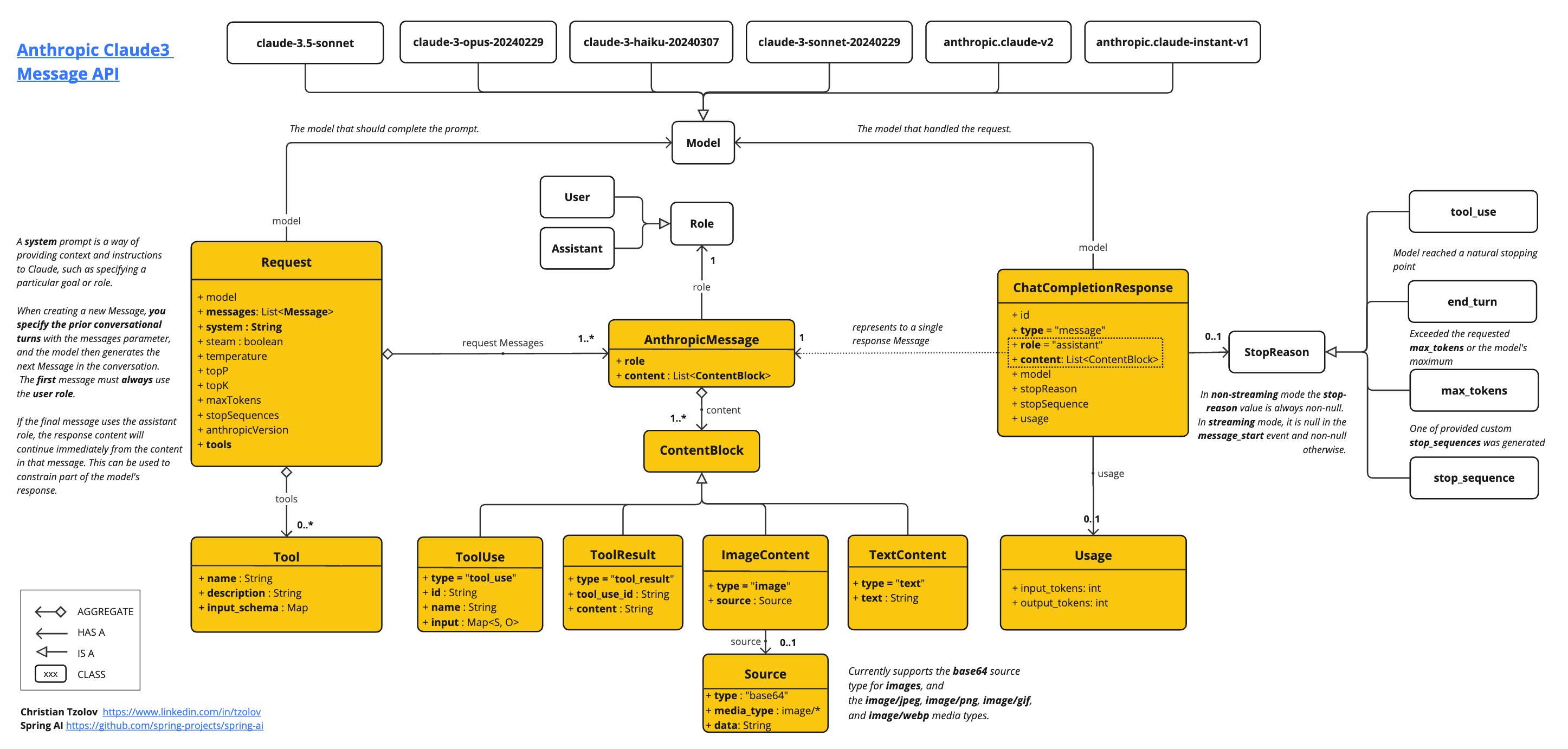
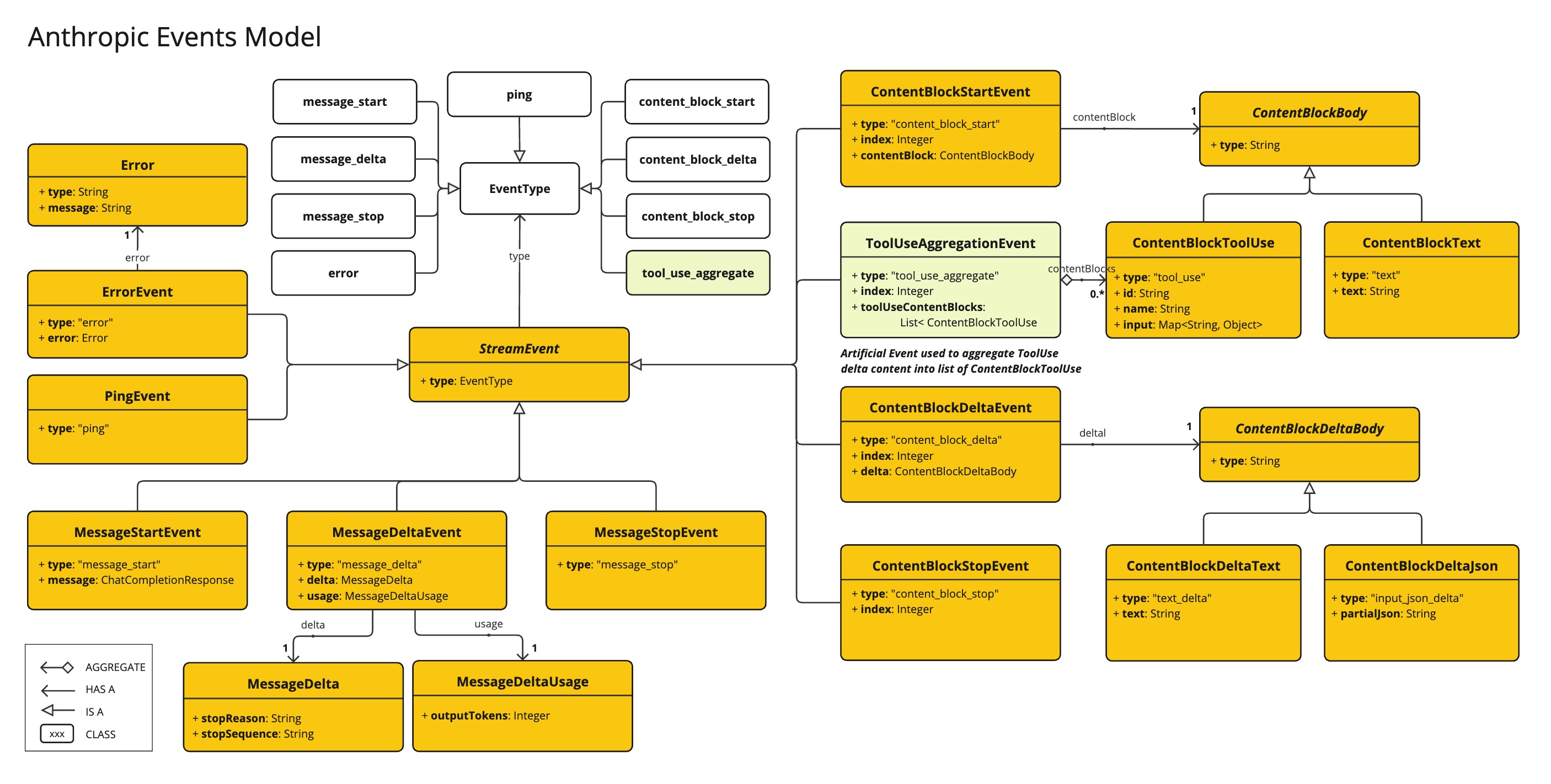
AnthropicApi 提供了一個輕量級的 Java 客戶端,用於 Anthropic Message API。
以下類圖說明了 AnthropicApi 聊天介面和構建塊
這是一個如何以程式設計方式使用 API 的簡單片段
AnthropicApi anthropicApi =
    new AnthropicApi(System.getenv("ANTHROPIC_API_KEY"));

AnthropicMessage chatCompletionMessage = new AnthropicMessage(
        List.of(new ContentBlock("Tell me a Joke?")), Role.USER);

// Sync request
ResponseEntity<ChatCompletionResponse> response = this.anthropicApi
    .chatCompletionEntity(new ChatCompletionRequest(AnthropicApi.ChatModel.CLAUDE_3_OPUS.getValue(),
            List.of(this.chatCompletionMessage), null, 100, 0.8, false));

// Streaming request
Flux<StreamResponse> response = this.anthropicApi
    .chatCompletionStream(new ChatCompletionRequest(AnthropicApi.ChatModel.CLAUDE_3_OPUS.getValue(),
            List.of(this.chatCompletionMessage), null, 100, 0.8, true));
有關詳細資訊,請參閱 AnthropicApi.java 的 JavaDoc。
低階 API 示例
-
AnthropicApiIT.java 測試提供了一些如何使用輕量級庫的通用示例。

