Perplexity 聊天
Perplexity AI 提供一項獨特的 AI 服務,它將自己的語言模型與即時搜尋功能相結合。它提供多種模型,並支援流式響應以實現會話式 AI。
Spring AI 透過複用現有的 OpenAI 客戶端與 Perplexity AI 整合。要開始使用,你需要獲取一個 Perplexity API 金鑰,配置基礎 URL,並選擇一個受支援的模型。
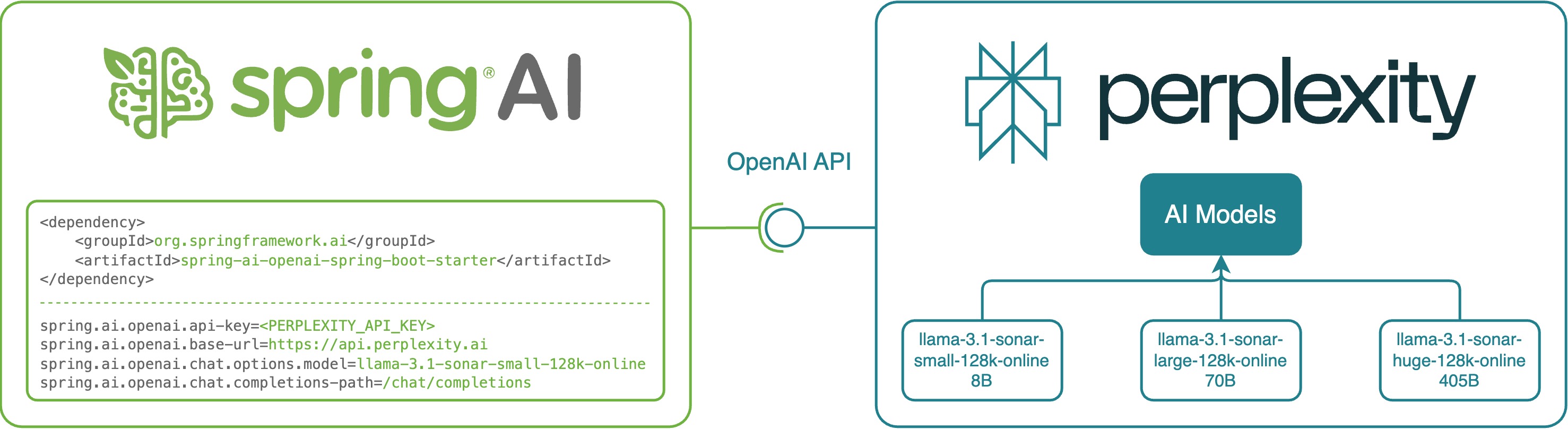
Perplexity API 與 OpenAI API 並非完全相容。Perplexity 將即時網路搜尋結果與其語言模型響應相結合。與 OpenAI 不同,Perplexity 不暴露 toolCalls - 函式呼叫 機制。此外,Perplexity 目前不支援多模態訊息。 |
請檢視 PerplexityWithOpenAiChatModelIT.java 測試用例,瞭解如何在 Spring AI 中使用 Perplexity 的示例。
先決條件
-
建立 API 金鑰:訪問 此處 建立 API 金鑰。在你的 Spring AI 專案中,使用
spring.ai.openai.api-key屬性進行配置。 -
設定 Perplexity 基礎 URL:將
spring.ai.openai.base-url屬性設定為https://api.perplexity.ai。 -
選擇 Perplexity 模型:使用
spring.ai.openai.chat.model=<model name>屬性指定模型。請參考 支援的模型 以獲取可用選項。 -
設定聊天完成路徑:將
spring.ai.openai.chat.completions-path設定為/chat/completions。有關更多詳細資訊,請參閱 聊天完成 API。
您可以在 application.properties 檔案中設定這些配置屬性
spring.ai.openai.api-key=<your-perplexity-api-key>
spring.ai.openai.base-url=https://api.perplexity.ai
spring.ai.openai.chat.model=llama-3.1-sonar-small-128k-online
spring.ai.openai.chat.completions-path=/chat/completions
為了在處理 API 金鑰等敏感資訊時增強安全性,您可以使用 Spring 表示式語言 (SpEL) 來引用自定義環境變數
# In application.yml
spring:
  ai:
    openai:
      api-key: ${PERPLEXITY_API_KEY}
      base-url: ${PERPLEXITY_BASE_URL}
      chat:
        model: ${PERPLEXITY_MODEL}
        completions-path: ${PERPLEXITY_COMPLETIONS_PATH}
# In your environment or .env file
export PERPLEXITY_API_KEY=<your-perplexity-api-key>
export PERPLEXITY_BASE_URL=https://api.perplexity.ai
export PERPLEXITY_MODEL=llama-3.1-sonar-small-128k-online
export PERPLEXITY_COMPLETIONS_PATH=/chat/completions您還可以在應用程式程式碼中以程式設計方式設定這些配置
// Retrieve configuration from secure sources or environment variables
String apiKey = System.getenv("PERPLEXITY_API_KEY");
String baseUrl = System.getenv("PERPLEXITY_BASE_URL");
String model = System.getenv("PERPLEXITY_MODEL");
String completionsPath = System.getenv("PERPLEXITY_COMPLETIONS_PATH");自動配置
|
Spring AI 自動配置、啟動模組的工件名稱發生了重大變化。請參閱 升級說明 以獲取更多資訊。 |
Spring AI 為 OpenAI 聊天客戶端提供了 Spring Boot 自動配置。要啟用它,請將以下依賴項新增到您的專案的 Maven pom.xml 或 Gradle build.gradle 構建檔案中
-
Maven
-
Gradle
<dependency>
    <groupId>org.springframework.ai</groupId>
    <artifactId>spring-ai-starter-model-openai</artifactId>
</dependency>
dependencies {
implementation 'org.springframework.ai:spring-ai-starter-model-openai'
}| 請參閱 依賴項管理 部分,將 Spring AI BOM 新增到您的構建檔案中。 |
聊天屬性
重試屬性
字首 spring.ai.retry 用作屬性字首,允許您為 OpenAI 聊天模型配置重試機制。
| 財產 | 描述 | 預設值 |
|---|---|---|
spring.ai.retry.max-attempts |
最大重試次數。 |
10 |
spring.ai.retry.backoff.initial-interval |
指數回退策略的初始休眠持續時間。 |
2 秒。 |
spring.ai.retry.backoff.multiplier |
回退間隔乘數。 |
5 |
spring.ai.retry.backoff.max-interval |
最大回退持續時間。 |
3 分鐘。 |
spring.ai.retry.on-client-errors |
如果為 false,則丟擲 NonTransientAiException,並且不嘗試重試 |
假 |
spring.ai.retry.exclude-on-http-codes |
不應觸發重試的 HTTP 狀態程式碼列表(例如,丟擲 NonTransientAiException)。 |
空 |
spring.ai.retry.on-http-codes |
應觸發重試的 HTTP 狀態程式碼列表(例如,丟擲 TransientAiException)。 |
空 |
連線屬性
字首 spring.ai.openai 用作屬性字首,允許您連線到 OpenAI。
| 財產 | 描述 | 預設值 |
|---|---|---|
spring.ai.openai.base-url |
要連線的 URL。必須設定為 |
- |
spring.ai.openai.chat.api-key |
您的 Perplexity API 金鑰 |
- |
配置屬性
|
聊天自動配置的啟用和停用現在透過以 要啟用,spring.ai.model.chat=openai (預設啟用) 要停用,spring.ai.model.chat=none (或任何不匹配 openai 的值) 此更改是為了允許配置多個模型。 |
字首 spring.ai.openai.chat 是屬性字首,允許您配置 OpenAI 的聊天模型實現。
| 財產 | 描述 | 預設值 |
|---|---|---|
spring.ai.model.chat |
啟用 OpenAI 聊天模型。 |
openai |
spring.ai.openai.chat.model |
其中一個受支援的 Perplexity 模型。示例: |
- |
spring.ai.openai.chat.base-url |
可選地覆蓋 spring.ai.openai.base-url 以提供聊天專用的 URL。必須設定為 |
- |
spring.ai.openai.chat.completions-path |
必須設定為 |
|
spring.ai.openai.chat.options.temperature |
響應中的隨機性大小,取值範圍為 0(包含)到 2(不包含)。值越高,隨機性越大;值越低,確定性越高。所需範圍: |
0.2 |
spring.ai.openai.chat.options.frequencyPenalty |
大於 0 的乘性懲罰。大於 1.0 的值會根據新令牌在迄今為止的文字中已存在的頻率對其進行懲罰,從而降低模型重複相同內容的可能性。值為 1.0 表示沒有懲罰。與 presence_penalty 不相容。所需範圍: |
1 |
spring.ai.openai.chat.options.maxTokens |
API 返回的最大完成令牌數量。max_tokens 中請求的令牌總數加上 messages 中傳送的提示令牌數不得超過所請求模型的上下文視窗令牌限制。如果未指定,則模型將生成令牌,直到達到其停止令牌或其上下文視窗的末尾。 |
- |
spring.ai.openai.chat.options.presencePenalty |
一個介於 -2.0 和 2.0 之間的值。正值根據新令牌是否出現在迄今為止的文字中對其進行懲罰,從而增加模型談論新主題的可能性。與 |
0 |
spring.ai.openai.chat.options.topP |
核取樣閾值,取值範圍為 0 到 1(包含)。對於每個後續令牌,模型會考慮 top_p 機率質量的令牌結果。我們建議修改 top_k 或 top_p,但不要同時修改兩者。所需範圍: |
0.9 |
spring.ai.openai.chat.options.stream-usage |
(僅限流式傳輸)設定為新增一個額外的塊,其中包含整個請求的令牌使用統計資訊。此塊的 |
假 |
所有以 spring.ai.openai.chat.options 為字首的屬性都可以在執行時透過向 Prompt 呼叫新增請求特定的 執行時選項 來覆蓋。 |
執行時選項
OpenAiChatOptions.java 提供了模型配置,例如要使用的模型、溫度、頻率懲罰等。
在啟動時,可以使用 OpenAiChatModel(api, options) 建構函式或 spring.ai.openai.chat.options.* 屬性配置預設選項。
在執行時,您可以透過向 Prompt 呼叫新增新的、請求特定的選項來覆蓋預設選項。例如,為特定請求覆蓋預設模型和溫度
ChatResponse response = chatModel.call(
    new Prompt(
        "Generate the names of 5 famous pirates.",
        OpenAiChatOptions.builder()
            .model("llama-3.1-sonar-large-128k-online")
            .temperature(0.4)
        .build()
));| 除了模型特定的 OpenAiChatOptions,您還可以使用可移植的 ChatOptions 例項,該例項透過 ChatOptions#builder() 建立。 |
示例控制器
建立 一個新的 Spring Boot 專案,並將 spring-ai-starter-model-openai 新增到您的 pom(或 gradle)依賴項中。
在src/main/resources目錄下新增一個application.properties檔案,以啟用和配置 OpenAi 聊天模型
spring.ai.openai.api-key=<PERPLEXITY_API_KEY>
spring.ai.openai.base-url=https://api.perplexity.ai
spring.ai.openai.chat.completions-path=/chat/completions
spring.ai.openai.chat.options.model=llama-3.1-sonar-small-128k-online
spring.ai.openai.chat.options.temperature=0.7

# The Perplexity API doesn't support embeddings, so we need to disable it.
spring.ai.openai.embedding.enabled=false
將 api-key 替換為您的 Perplexity API 金鑰。 |
這將建立一個 OpenAiChatModel 實現,您可以將其注入到您的類中。以下是一個簡單的 @Controller 類使用聊天模型進行文字生成的示例。
@RestController
public class ChatController {

    private final OpenAiChatModel chatModel;

    @Autowired
    public ChatController(OpenAiChatModel chatModel) {
        this.chatModel = chatModel;
    }

    @GetMapping("/ai/generate")
    public Map generate(@RequestParam(value = "message", defaultValue = "Tell me a joke") String message) {
        return Map.of("generation", this.chatModel.call(message));
    }

    @GetMapping("/ai/generateStream")
	public Flux<ChatResponse> generateStream(@RequestParam(value = "message", defaultValue = "Tell me a joke") String message) {
        Prompt prompt = new Prompt(new UserMessage(message));
        return this.chatModel.stream(prompt);
    }
}
支援的模型
Perplexity 支援多種模型,這些模型經過最佳化,可用於增強搜尋功能的對話式 AI。有關詳細資訊,請參閱 支援的模型。

