OpenAI 聊天
Spring AI 支援 OpenAI 的各種 AI 語言模型,OpenAI 是 ChatGPT 背後的公司,憑藉其建立行業領先的文字生成模型和嵌入,在激發人們對 AI 驅動的文字生成的興趣方面發揮了重要作用。
先決條件
您需要使用 OpenAI 建立一個 API 才能訪問 ChatGPT 模型。
在 OpenAI 註冊頁面 建立一個帳戶,並在 API 金鑰頁面 生成令牌。
Spring AI 專案定義了一個名為 spring.ai.openai.api-key 的配置屬性,您應該將其設定為從 openai.com 獲取的 API 金鑰 的值。
您可以在 application.properties 檔案中設定此配置屬性
spring.ai.openai.api-key=<your-openai-api-key>為了增強處理 API 金鑰等敏感資訊時的安全性,您可以使用 Spring 表示式語言 (SpEL) 引用自定義環境變數
# In application.yml
spring:
  ai:
    openai:
      api-key: ${OPENAI_API_KEY}
# In your environment or .env file
export OPENAI_API_KEY=<your-openai-api-key>您還可以在應用程式程式碼中以程式設計方式設定此配置
// Retrieve API key from a secure source or environment variable
String apiKey = System.getenv("OPENAI_API_KEY");自動配置
|
Spring AI 自動配置、啟動模組的工件名稱發生了重大變化。請參閱 升級說明 以獲取更多資訊。 |
Spring AI 為 OpenAI 聊天客戶端提供了 Spring Boot 自動配置。要啟用它,請將以下依賴項新增到專案的 Maven pom.xml 或 Gradle build.gradle 構建檔案中
-
Maven
-
Gradle
<dependency>
    <groupId>org.springframework.ai</groupId>
    <artifactId>spring-ai-starter-model-openai</artifactId>
</dependency>
dependencies {
implementation 'org.springframework.ai:spring-ai-starter-model-openai'
}| 請參閱 依賴項管理 部分,將 Spring AI BOM 新增到您的構建檔案中。 |
聊天屬性
重試屬性
字首 spring.ai.retry 用作屬性字首,可讓您配置 OpenAI 聊天模型的重試機制。
| 財產 | 描述 | 預設值 |
|---|---|---|
spring.ai.retry.max-attempts |
最大重試次數。 |
10 |
spring.ai.retry.backoff.initial-interval |
指數退避策略的初始休眠持續時間。 |
2 秒。 |
spring.ai.retry.backoff.multiplier |
退避間隔乘數。 |
5 |
spring.ai.retry.backoff.max-interval |
最大退避持續時間。 |
3 分鐘。 |
spring.ai.retry.on-client-errors |
如果為 false,則丟擲 NonTransientAiException,並且不嘗試重試 |
假 |
spring.ai.retry.exclude-on-http-codes |
不應觸發重試的 HTTP 狀態程式碼列表(例如,丟擲 NonTransientAiException)。 |
空 |
spring.ai.retry.on-http-codes |
應觸發重試的 HTTP 狀態程式碼列表(例如,丟擲 TransientAiException)。 |
空 |
連線屬性
字首 spring.ai.openai 用作屬性字首,可讓您連線到 OpenAI。
| 財產 | 描述 | 預設值 |
|---|---|---|
spring.ai.openai.base-url |
要連線的 URL |
|
spring.ai.openai.api-key |
API 金鑰 |
- |
spring.ai.openai.organization-id |
您可以選擇指定用於 API 請求的組織。 |
- |
spring.ai.openai.project-id |
您可以選擇指定用於 API 請求的專案。 |
- |
| 對於屬於多個組織(或透過其舊版使用者 API 金鑰訪問其專案)的使用者,您可以選擇指定用於 API 請求的組織和專案。這些 API 請求的用量將計入指定組織和專案的用量。 |
User-Agent 標頭
Spring AI 自動向 OpenAI 的所有請求傳送 User-Agent: spring-ai 標頭。這有助於 OpenAI 識別源自 Spring AI 的請求,用於分析和支援目的。此標頭會自動傳送,無需 Spring AI 使用者進行任何配置。
如果您是 API 提供商,正在構建 OpenAI 相容服務,您可以透過讀取伺服器上傳入請求的 User-Agent HTTP 標頭來跟蹤 Spring AI 的使用情況。
配置屬性
|
聊天自動配置的啟用和停用現在透過以 要啟用,請將 spring.ai.model.chat=openai(預設啟用) 要停用,請將 spring.ai.model.chat=none(或任何不匹配 openai 的值) 此更改是為了允許配置多個模型。 |
字首 spring.ai.openai.chat 是屬性字首,可讓您配置 OpenAI 的聊天模型實現。
| 財產 | 描述 | 預設值 |
|---|---|---|
spring.ai.openai.chat.enabled (已移除且不再有效) |
啟用 OpenAI 聊天模型。 |
true |
spring.ai.model.chat |
啟用 OpenAI 聊天模型。 |
openai |
spring.ai.openai.chat.base-url |
用於 |
- |
spring.ai.openai.chat.completions-path |
要附加到基本 URL 的路徑。 |
|
spring.ai.openai.chat.api-key |
用於 |
- |
spring.ai.openai.chat.organization-id |
您可以選擇指定用於 API 請求的組織。 |
- |
spring.ai.openai.chat.project-id |
您可以選擇指定用於 API 請求的專案。 |
- |
spring.ai.openai.chat.options.model |
要使用的 OpenAI 聊天模型的名稱。您可以選擇的模型包括: |
|
spring.ai.openai.chat.options.temperature |
用於控制生成完成內容明顯創造性的取樣溫度。較高的值會使輸出更隨機,而較低的值會使結果更集中和確定性。不建議為同一完成請求同時修改 |
0.8 |
spring.ai.openai.chat.options.frequencyPenalty |
介於 -2.0 和 2.0 之間的數字。正值根據文字中現有頻率對新標記進行懲罰,從而降低模型重複相同行的可能性。 |
0.0f |
spring.ai.openai.chat.options.logitBias |
修改指定標記出現在完成內容中的可能性。 |
- |
spring.ai.openai.chat.options.maxTokens |
在聊天完成中生成的最大標記數。輸入標記和生成標記的總長度受模型上下文長度的限制。用於非推理模型(例如,gpt-4o,gpt-3.5-turbo)。不能用於推理模型(例如,o1,o3,o4-mini 系列)。與 maxCompletionTokens 互斥 - 同時設定兩者將導致 API 錯誤。 |
- |
spring.ai.openai.chat.options.maxCompletionTokens |
完成生成標記數的上限,包括可見輸出標記和推理標記。推理模型必需(例如,o1,o3,o4-mini 系列)。不能用於非推理模型(例如,gpt-4o,gpt-3.5-turbo)。與 maxTokens 互斥 - 同時設定兩者將導致 API 錯誤。 |
- |
spring.ai.openai.chat.options.n |
為每個輸入訊息生成多少個聊天完成選項。請注意,您將根據所有選項中生成的標記數收費。將 |
1 |
spring.ai.openai.chat.options.store |
是否儲存此聊天完成請求的輸出以供模型使用 |
假 |
spring.ai.openai.chat.options.metadata |
開發人員定義的標籤和值,用於在聊天完成儀表板中過濾完成內容 |
空對映 |
spring.ai.openai.chat.options.output-modalities |
您希望模型為此請求生成的輸出型別。大多數模型都能夠生成文字,這是預設設定。 |
- |
spring.ai.openai.chat.options.output-audio |
音訊生成的音訊引數。當 |
- |
spring.ai.openai.chat.options.presencePenalty |
介於 -2.0 和 2.0 之間的數字。正值根據新標記是否出現在文字中對新標記進行懲罰,從而增加模型談論新主題的可能性。 |
- |
spring.ai.openai.chat.options.responseFormat.type |
與 |
- |
spring.ai.openai.chat.options.responseFormat.name |
響應格式模式名稱。僅適用於 |
custom_schema |
spring.ai.openai.chat.options.responseFormat.schema |
響應格式 JSON 模式。僅適用於 |
- |
spring.ai.openai.chat.options.responseFormat.strict |
響應格式 JSON 模式遵循嚴格性。僅適用於 |
- |
spring.ai.openai.chat.options.seed |
此功能處於 Beta 階段。如果指定,我們的系統將盡力確定性地取樣,以便使用相同種子和引數的重複請求應返回相同的結果。 |
- |
spring.ai.openai.chat.options.stop |
API 將停止生成更多標記的最多 4 個序列。 |
- |
spring.ai.openai.chat.options.topP |
一種替代溫度取樣的核取樣方法,其中模型考慮具有 |
- |
spring.ai.openai.chat.options.tools |
模型可以呼叫的工具列表。目前,僅支援函式作為工具。使用此項提供模型可以為其生成 JSON 輸入的函式列表。 |
- |
spring.ai.openai.chat.options.toolChoice |
控制模型呼叫哪個(如果有)函式。 |
- |
spring.ai.openai.chat.options.user |
代表您的終端使用者的唯一識別符號,可以幫助 OpenAI 監控和檢測濫用。 |
- |
spring.ai.openai.chat.options.stream-usage |
(僅限流式傳輸)設定為新增一個額外的塊,其中包含整個請求的令牌使用統計資訊。此塊的 |
假 |
spring.ai.openai.chat.options.parallel-tool-calls |
在使用工具時是否啟用 並行函式呼叫。 |
true |
spring.ai.openai.chat.options.prompt-cache-key |
OpenAI 用於最佳化類似請求的快取命中率的快取鍵。提高延遲並降低成本。取代用於快取目的的已棄用的 |
- |
spring.ai.openai.chat.options.safety-identifier |
一個穩定的識別符號,用於幫助 OpenAI 檢測違反使用策略的使用者。應為雜湊值(例如,雜湊後的使用者名稱或電子郵件)。取代用於安全跟蹤的已棄用的 |
- |
spring.ai.openai.chat.options.http-headers |
要新增到聊天完成請求的可選 HTTP 標頭。要覆蓋 |
- |
spring.ai.openai.chat.options.tool-names |
工具列表,透過其名稱標識,用於在單個提示請求中啟用函式呼叫。具有這些名稱的工具必須存在於 ToolCallback 登錄檔中。 |
- |
spring.ai.openai.chat.options.tool-callbacks |
要註冊到 ChatModel 的工具回撥。 |
- |
spring.ai.openai.chat.options.internal-tool-execution-enabled |
如果為 false,Spring AI 將不會在內部處理工具呼叫,而是將其代理到客戶端。然後,客戶端負責處理工具呼叫,將其分派到適當的函式,並返回結果。如果為 true(預設),Spring AI 將在內部處理函式呼叫。僅適用於支援函式呼叫的聊天模型 |
true |
spring.ai.openai.chat.options.service-tier |
指定用於服務請求的 處理型別。 |
- |
spring.ai.openai.chat.options.extra-body |
請求中包含的附加引數。接受任何鍵值對,這些鍵值對會被展平到 JSON 請求的頂層。旨在與支援標準 OpenAI API 之外引數的 OpenAI 相容伺服器(vLLM、Ollama 等)一起使用。官方 OpenAI API 忽略未知引數。有關詳細資訊,請參閱 將額外引數與 OpenAI 相容伺服器一起使用。 |
- |
|
使用 GPT-5 模型(如 |
您可以為 ChatModel 和 EmbeddingModel 實現覆蓋通用的 spring.ai.openai.base-url 和 spring.ai.openai.api-key。如果設定了 spring.ai.openai.chat.base-url 和 spring.ai.openai.chat.api-key 屬性,它們將優先於通用屬性。這在您想為不同的模型和不同的模型端點使用不同的 OpenAI 帳戶時很有用。 |
所有以 spring.ai.openai.chat.options 為字首的屬性都可以在執行時透過向 Prompt 呼叫新增請求特定的 執行時選項 來覆蓋。 |
標記限制引數:模型特定用法
OpenAI 提供了兩個互斥的引數來控制標記生成限制
| 引數 | 用例 | 相容模型 |
|---|---|---|
|
非推理模型 |
gpt-4o, gpt-4o-mini, gpt-4-turbo, gpt-3.5-turbo |
|
推理模型 |
o1, o1-mini, o1-preview, o3, o4-mini 系列 |
| 這些引數互斥。同時設定兩者將導致 OpenAI API 錯誤。 |
使用示例
適用於非推理模型 (gpt-4o, gpt-3.5-turbo)
ChatResponse response = chatModel.call(
    new Prompt(
        "Explain quantum computing in simple terms.",
        OpenAiChatOptions.builder()
            .model("gpt-4o")
            .maxTokens(150)  // Use maxTokens for non-reasoning models
        .build()
    ));
適用於推理模型 (o1, o3 系列)
ChatResponse response = chatModel.call(
    new Prompt(
        "Solve this complex math problem step by step: ...",
        OpenAiChatOptions.builder()
            .model("o1-preview")
            .maxCompletionTokens(1000)  // Use maxCompletionTokens for reasoning models
        .build()
    ));
構建器模式驗證: OpenAI ChatOptions 構建器透過“後設者勝”的方法自動強制執行互斥
// This will automatically clear maxTokens and use maxCompletionTokens
OpenAiChatOptions options = OpenAiChatOptions.builder()
    .maxTokens(100)           // Set first
    .maxCompletionTokens(200) // This clears maxTokens and logs a warning
    .build();

// Result: maxTokens = null, maxCompletionTokens = 200
執行時選項
OpenAiChatOptions.java 類提供了模型配置,例如要使用的模型、溫度、頻率懲罰等。
啟動時,可以使用 OpenAiChatModel(api, options) 建構函式或 spring.ai.openai.chat.options.* 屬性配置預設選項。
在執行時,您可以透過向 Prompt 呼叫新增新的、請求特定的選項來覆蓋預設選項。例如,要為特定請求覆蓋預設模型和溫度
ChatResponse response = chatModel.call(
    new Prompt(
        "Generate the names of 5 famous pirates.",
        OpenAiChatOptions.builder()
            .model("gpt-4o")
            .temperature(0.4)
        .build()
    ));
除了模型特定的 OpenAiChatOptions,您還可以使用可移植的 ChatOptions 例項,該例項使用 ChatOptions#builder() 建立。 |
函式呼叫
您可以使用 OpenAiChatModel 註冊自定義 Java 函式,並讓 OpenAI 模型智慧地選擇輸出包含呼叫一個或多個註冊函式引數的 JSON 物件。這是一種將 LLM 功能與外部工具和 API 連線的強大技術。閱讀更多關於 工具呼叫 的資訊。
多模態
多模態是指模型同時理解和處理來自各種來源(包括文字、影像、音訊和其他資料格式)資訊的能力。OpenAI 支援文字、視覺和音訊輸入模態。
視覺
提供視覺多模態支援的 OpenAI 模型包括 gpt-4、gpt-4o 和 gpt-4o-mini。有關更多資訊,請參閱 視覺 指南。
OpenAI 使用者訊息 API 可以將 base64 編碼的影像列表或影像 URL 與訊息一起合併。Spring AI 的 訊息 介面透過引入 媒體 型別來促進多模態 AI 模型。此型別包含有關訊息中媒體附件的資料和詳細資訊,利用 Spring 的 org.springframework.util.MimeType 和用於原始媒體資料的 org.springframework.core.io.Resource。
以下是摘自 OpenAiChatModelIT.java 的程式碼示例,說明了使用 gpt-4o 模型將使用者文字與影像融合。
var imageResource = new ClassPathResource("/multimodal.test.png");

var userMessage = new UserMessage("Explain what do you see on this picture?",
        new Media(MimeTypeUtils.IMAGE_PNG, this.imageResource));

ChatResponse response = chatModel.call(new Prompt(this.userMessage,
OpenAiChatOptions.builder().model(OpenAiApi.ChatModel.GPT_4_O.getValue()).build()));| 從 2024 年 6 月 17 日起,GPT_4_VISION_PREVIEW 將僅適用於此模型的現有使用者。如果您不是現有使用者,請使用 GPT_4_O 或 GPT_4_TURBO 模型。更多詳情請參閱 此處 |
或使用 gpt-4o 模型等效的影像 URL
var userMessage = new UserMessage("Explain what do you see on this picture?",
        new Media(MimeTypeUtils.IMAGE_PNG,
                URI.create("https://docs.springframework.tw/spring-ai/reference/_images/multimodal.test.png")));

ChatResponse response = chatModel.call(new Prompt(this.userMessage,
OpenAiChatOptions.builder().model(OpenAiApi.ChatModel.GPT_4_O.getValue()).build()));| 您也可以傳遞多張圖片。 |
該示例顯示了一個模型將 multimodal.test.png 影像作為輸入

以及文字訊息“解釋你在這張圖片上看到了什麼?”,並生成如下響應
This is an image of a fruit bowl with a simple design. The bowl is made of metal with curved wire edges that
create an open structure, allowing the fruit to be visible from all angles. Inside the bowl, there are two
yellow bananas resting on top of what appears to be a red apple. The bananas are slightly overripe, as
indicated by the brown spots on their peels. The bowl has a metal ring at the top, likely to serve as a handle
for carrying. The bowl is placed on a flat surface with a neutral-colored background that provides a clear
view of the fruit inside.
音訊
提供輸入音訊多模態支援的 OpenAI 模型包括 gpt-4o-audio-preview。有關更多資訊,請參閱 音訊 指南。
OpenAI 使用者訊息 API 可以將 base64 編碼的音訊檔案列表與訊息一起合併。Spring AI 的 訊息 介面透過引入 媒體 型別來促進多模態 AI 模型。此型別包含有關訊息中媒體附件的資料和詳細資訊,利用 Spring 的 org.springframework.util.MimeType 和用於原始媒體資料的 org.springframework.core.io.Resource。目前,OpenAI 僅支援以下媒體型別:audio/mp3 和 audio/wav。
以下是摘自 OpenAiChatModelIT.java 的程式碼示例,說明了使用 gpt-4o-audio-preview 模型將使用者文字與音訊檔案融合。
var audioResource = new ClassPathResource("speech1.mp3");

var userMessage = new UserMessage("What is this recording about?",
        List.of(new Media(MimeTypeUtils.parseMimeType("audio/mp3"), audioResource)));

ChatResponse response = chatModel.call(new Prompt(List.of(userMessage),
OpenAiChatOptions.builder().model(OpenAiApi.ChatModel.GPT_4_O_AUDIO_PREVIEW).build()));| 您也可以傳遞多個音訊檔案。 |
輸出音訊
提供輸入音訊多模態支援的 OpenAI 模型包括 gpt-4o-audio-preview。有關更多資訊,請參閱 音訊 指南。
OpenAI 助手訊息 API 可以包含 base64 編碼的音訊檔案列表以及訊息。Spring AI 的 訊息 介面透過引入 媒體 型別來促進多模態 AI 模型。此型別包含有關訊息中媒體附件的資料和詳細資訊,利用 Spring 的 org.springframework.util.MimeType 和用於原始媒體資料的 org.springframework.core.io.Resource。目前,OpenAI 僅支援以下音訊型別:audio/mp3 和 audio/wav。
以下是一個程式碼示例,說明了使用者文字以及音訊位元組陣列的響應,使用 gpt-4o-audio-preview 模型
var userMessage = new UserMessage("Tell me joke about Spring Framework");

ChatResponse response = chatModel.call(new Prompt(List.of(userMessage),
        OpenAiChatOptions.builder()
            .model(OpenAiApi.ChatModel.GPT_4_O_AUDIO_PREVIEW)
            .outputModalities(List.of("text", "audio"))
            .outputAudio(new AudioParameters(Voice.ALLOY, AudioResponseFormat.WAV))
            .build()));

String text = response.getResult().getOutput().getContent(); // audio transcript

byte[] waveAudio = response.getResult().getOutput().getMedia().get(0).getDataAsByteArray(); // audio data
您必須在 OpenAiChatOptions 中指定 audio 模態才能生成音訊輸出。AudioParameters 類提供了音訊輸出的語音和音訊格式。
結構化輸出
OpenAI 提供了自定義的 結構化輸出 API,可確保您的模型生成嚴格符合您提供的 JSON Schema 的響應。除了現有的 Spring AI 模型無關 結構化輸出轉換器 之外,這些 API 還提供了增強的控制和精度。
| 目前,OpenAI 支援 JSON Schema 語言的子集 格式。 |
配置
Spring AI 允許您透過 OpenAiChatOptions 構建器或透過應用程式屬性來配置響應格式。
使用聊天選項構建器
您可以使用 OpenAiChatOptions 構建器以程式設計方式設定響應格式,如下所示
String jsonSchema = """
        {
            "type": "object",
            "properties": {
                "steps": {
                    "type": "array",
                    "items": {
                        "type": "object",
                        "properties": {
                            "explanation": { "type": "string" },
                            "output": { "type": "string" }
                        },
                        "required": ["explanation", "output"],
                        "additionalProperties": false
                    }
                },
                "final_answer": { "type": "string" }
            },
            "required": ["steps", "final_answer"],
            "additionalProperties": false
        }
        """;

Prompt prompt = new Prompt("how can I solve 8x + 7 = -23",
        OpenAiChatOptions.builder()
            .model(ChatModel.GPT_4_O_MINI)
            .responseFormat(new ResponseFormat(ResponseFormat.Type.JSON_SCHEMA, this.jsonSchema))
            .build());

ChatResponse response = this.openAiChatModel.call(this.prompt);| 遵循 OpenAI JSON Schema 語言子集 格式。 |
與 BeanOutputConverter 工具整合
您可以利用現有的 BeanOutputConverter 工具,自動從您的領域物件生成 JSON Schema,然後將結構化響應轉換為領域特定的例項
-
Java
-
Kotlin
record MathReasoning(
    @JsonProperty(required = true, value = "steps") Steps steps,
    @JsonProperty(required = true, value = "final_answer") String finalAnswer) {

    record Steps(
        @JsonProperty(required = true, value = "items") Items[] items) {

        record Items(
            @JsonProperty(required = true, value = "explanation") String explanation,
            @JsonProperty(required = true, value = "output") String output) {
        }
    }
}

var outputConverter = new BeanOutputConverter<>(MathReasoning.class);

var jsonSchema = this.outputConverter.getJsonSchema();

Prompt prompt = new Prompt("how can I solve 8x + 7 = -23",
        OpenAiChatOptions.builder()
            .model(ChatModel.GPT_4_O_MINI)
            .responseFormat(new ResponseFormat(ResponseFormat.Type.JSON_SCHEMA, this.jsonSchema))
            .build());

ChatResponse response = this.openAiChatModel.call(this.prompt);
String content = this.response.getResult().getOutput().getContent();

MathReasoning mathReasoning = this.outputConverter.convert(this.content);
data class MathReasoning(
val steps: Steps,
@get:JsonProperty(value = "final_answer") val finalAnswer: String) {
data class Steps(val items: Array<Items>) {
data class Items(
val explanation: String,
val output: String)
}
}
val outputConverter = BeanOutputConverter(MathReasoning::class.java)
val jsonSchema = outputConverter.jsonSchema;
val prompt = Prompt("how can I solve 8x + 7 = -23",
OpenAiChatOptions.builder()
.model(ChatModel.GPT_4_O_MINI)
.responseFormat(ResponseFormat(ResponseFormat.Type.JSON_SCHEMA, jsonSchema))
.build())
val response = openAiChatModel.call(prompt)
val content = response.getResult().getOutput().getContent()
val mathReasoning = outputConverter.convert(content)透過應用程式屬性配置
或者,在使用 OpenAI 自動配置時,您可以透過以下應用程式屬性配置所需的響應格式
spring.ai.openai.api-key=YOUR_API_KEY
spring.ai.openai.chat.options.model=gpt-4o-mini

spring.ai.openai.chat.options.response-format.type=JSON_SCHEMA
spring.ai.openai.chat.options.response-format.name=MySchemaName
spring.ai.openai.chat.options.response-format.schema={"type":"object","properties":{"steps":{"type":"array","items":{"type":"object","properties":{"explanation":{"type":"string"},"output":{"type":"string"}},"required":["explanation","output"],"additionalProperties":false}},"final_answer":{"type":"string"}},"required":["steps","final_answer"],"additionalProperties":false}
spring.ai.openai.chat.options.response-format.strict=true
示例控制器
建立 一個新的 Spring Boot 專案,並將 spring-ai-starter-model-openai 新增到您的 pom(或 gradle)依賴項中。
在 src/main/resources 目錄下新增一個 application.properties 檔案,以啟用和配置 OpenAi 聊天模型
spring.ai.openai.api-key=YOUR_API_KEY
spring.ai.openai.chat.options.model=gpt-4o
spring.ai.openai.chat.options.temperature=0.7
用您的 OpenAI 憑據替換 api-key。 |
這將建立一個 OpenAiChatModel 實現,您可以將其注入到您的類中。這是一個簡單的 @RestController 類的示例,該類使用聊天模型進行文字生成。
@RestController
public class ChatController {

    private final OpenAiChatModel chatModel;

    @Autowired
    public ChatController(OpenAiChatModel chatModel) {
        this.chatModel = chatModel;
    }

    @GetMapping("/ai/generate")
    public Map<String,String> generate(@RequestParam(value = "message", defaultValue = "Tell me a joke") String message) {
        return Map.of("generation", this.chatModel.call(message));
    }

    @GetMapping("/ai/generateStream")
	public Flux<ChatResponse> generateStream(@RequestParam(value = "message", defaultValue = "Tell me a joke") String message) {
        Prompt prompt = new Prompt(new UserMessage(message));
        return this.chatModel.stream(prompt);
    }
}
手動配置
OpenAiChatModel 實現了 ChatModel 和 StreamingChatModel,並使用 低階 OpenAiApi 客戶端 連線到 OpenAI 服務。
將 spring-ai-openai 依賴項新增到專案的 Maven pom.xml 檔案中
<dependency>
    <groupId>org.springframework.ai</groupId>
    <artifactId>spring-ai-openai</artifactId>
</dependency>
或新增到您的 Gradle build.gradle 構建檔案中。
dependencies {
    implementation 'org.springframework.ai:spring-ai-openai'
}| 請參閱 依賴項管理 部分,將 Spring AI BOM 新增到您的構建檔案中。 |
接下來,建立一個 OpenAiChatModel 並將其用於文字生成
var openAiApi = OpenAiApi.builder()
            .apiKey(System.getenv("OPENAI_API_KEY"))
            .build();
var openAiChatOptions = OpenAiChatOptions.builder()
            .model("gpt-3.5-turbo")
            .temperature(0.4)
            .maxTokens(200)
            .build();
var chatModel = new OpenAiChatModel(this.openAiApi, this.openAiChatOptions);

ChatResponse response = this.chatModel.call(
    new Prompt("Generate the names of 5 famous pirates."));

// Or with streaming responses
Flux<ChatResponse> response = this.chatModel.stream(
    new Prompt("Generate the names of 5 famous pirates."));
OpenAiChatOptions 提供聊天請求的配置資訊。OpenAiApi.Builder 和 OpenAiChatOptions.Builder 分別是用於 API 客戶端和聊天配置的流暢選項構建器。
低階 OpenAiApi 客戶端
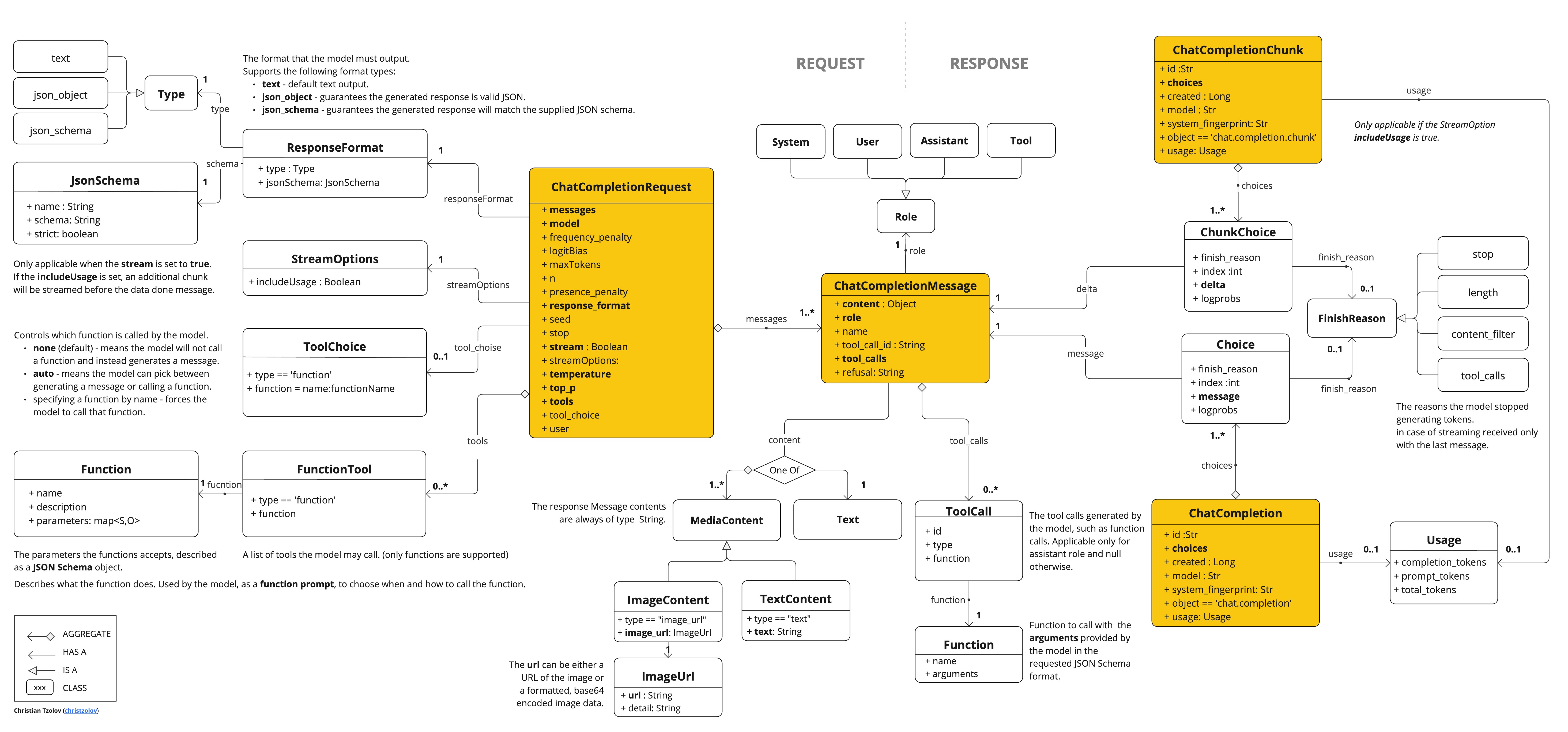
OpenAiApi 為 OpenAI 聊天 API OpenAI 聊天 API 提供了輕量級 Java 客戶端。
以下類圖說明了 OpenAiApi 聊天介面和構建塊
以下是一個簡單的程式碼片段,展示瞭如何以程式設計方式使用 API
OpenAiApi openAiApi = OpenAiApi.builder()
            .apiKey(System.getenv("OPENAI_API_KEY"))
            .build();

ChatCompletionMessage chatCompletionMessage =
    new ChatCompletionMessage("Hello world", Role.USER);

// Sync request
ResponseEntity<ChatCompletion> response = this.openAiApi.chatCompletionEntity(
    new ChatCompletionRequest(List.of(this.chatCompletionMessage), "gpt-3.5-turbo", 0.8, false));

// Streaming request
Flux<ChatCompletionChunk> streamResponse = this.openAiApi.chatCompletionStream(
        new ChatCompletionRequest(List.of(this.chatCompletionMessage), "gpt-3.5-turbo", 0.8, true));
請查閱 OpenAiApi.java 的 JavaDoc 以獲取更多資訊。
低階 API 示例
-
OpenAiApiIT.java測試提供了一些如何使用輕量級庫的通用示例。 -
OpenAiApiToolFunctionCallIT.java測試展示瞭如何使用低階 API 呼叫工具函式。基於 OpenAI 函式呼叫 教程。
低階 OpenAiFileApi 客戶端
OpenAiFileApi 為 OpenAI 檔案 API 提供了輕量級 Java 客戶端,支援檔案管理操作,例如上傳、列出、檢索、刪除檔案以及訪問檔案內容。OpenAI 檔案 API
以下是一個簡單的程式碼片段,展示瞭如何以程式設計方式使用 API
OpenAiFileApi openAiFileApi = OpenAiFileApi.builder()
			.apiKey(new SimpleApiKey(System.getenv("OPENAI_API_KEY")))
			.build();

// Upload a file
byte[] fileBytes = Files.readAllBytes(Paths.get("evals.jsonl"));
OpenAiFileApi.UploadFileRequest uploadRequest = OpenAiFileApi.UploadFileRequest.builder()
			.file(fileBytes)
			.fileName("evals-data.jsonl")
			.purpose(OpenAiFileApi.Purpose.EVALS)
			.build();
ResponseEntity<OpenAiFileApi.FileObject> uploadResponse = openAiFileApi.uploadFile(uploadRequest);

// List files
OpenAiFileApi.ListFileRequest listRequest = OpenAiFileApi.ListFileRequest.builder()
			.purpose(OpenAiFileApi.Purpose.EVALS)
			.build();
ResponseEntity<OpenAiFileApi.FileObjectResponse> listResponse = openAiFileApi.listFiles(listRequest);

// Retrieve file information
ResponseEntity<OpenAiFileApi.FileObject> fileInfo = openAiFileApi.retrieveFile("file-id");

// Delete a file
ResponseEntity<OpenAiFileApi.DeleteFileResponse> deleteResponse = openAiFileApi.deleteFile("file-id");

// Retrieve file content
ResponseEntity<String> fileContent = openAiFileApi.retrieveFileContent("file-id");
低階檔案 API 示例
-
OpenAiFileApiIT.java測試提供了一些如何使用輕量級檔案 api 庫的通用示例。
API 金鑰管理
Spring AI 透過 ApiKey 介面及其實現提供靈活的 API 金鑰管理。預設實現 SimpleApiKey 適用於大多數用例,但您也可以為更復雜的場景建立自定義實現。
預設配置
預設情況下,Spring Boot 自動配置將使用 spring.ai.openai.api-key 屬性建立 API 金鑰 bean
spring.ai.openai.api-key=your-api-key-here自定義 API 金鑰配置
您可以使用構建器模式建立具有自己的 ApiKey 實現的 OpenAiApi 自定義例項
ApiKey customApiKey = new ApiKey() {
    @Override
    public String getValue() {
        // Custom logic to retrieve API key
        return "your-api-key-here";
    }
};

OpenAiApi openAiApi = OpenAiApi.builder()
    .apiKey(customApiKey)
    .build();

// Create a chat model with the custom OpenAiApi instance
OpenAiChatModel chatModel = OpenAiChatModel.builder()
    .openAiApi(openAiApi)
    .build();
// Build the ChatClient using the custom chat model
ChatClient openAiChatClient = ChatClient.builder(chatModel).build();
這在您需要以下情況時很有用
-
從安全金鑰儲存中檢索 API 金鑰
-
動態輪換 API 金鑰
-
實現自定義 API 金鑰選擇邏輯
與 OpenAI 相容伺服器一起使用額外引數
vLLM、Ollama 等與 OpenAI 相容的推理伺服器通常支援 OpenAI 標準 API 中定義之外的附加引數。例如,這些伺服器可能接受 top_k、repetition_penalty 或其他官方 OpenAI API 不識別的取樣控制引數。
extraBody 選項允許您將任意引數傳遞給這些伺服器。extraBody 中提供的任何鍵值對都包含在 JSON 請求的頂層,使您能夠在使用 Spring AI 的 OpenAI 客戶端時利用伺服器特定功能。
|
|
使用屬性進行配置
您可以使用 Spring Boot 屬性配置額外引數。spring.ai.openai.chat.options.extra-body 下的每個屬性都成為請求中的頂級引數
spring.ai.openai.base-url=https://:8000/v1
spring.ai.openai.chat.options.model=meta-llama/Llama-3-8B-Instruct
spring.ai.openai.chat.options.temperature=0.7
spring.ai.openai.chat.options.extra-body.top_k=50
spring.ai.openai.chat.options.extra-body.repetition_penalty=1.1
此配置將生成類似以下的 JSON 請求
{
  "model": "meta-llama/Llama-3-8B-Instruct",
  "temperature": 0.7,
  "top_k": 50,
  "repetition_penalty": 1.1,
  "messages": [...]
}
使用構建器進行執行時配置
您還可以使用選項構建器在執行時指定額外引數
ChatResponse response = chatModel.call(
    new Prompt(
        "Tell me a creative story",
        OpenAiChatOptions.builder()
            .model("meta-llama/Llama-3-8B-Instruct")
            .temperature(0.7)
            .extraBody(Map.of(
                "top_k", 50,
                "repetition_penalty", 1.1,
                "frequency_penalty", 0.5
            ))
            .build()
    ));
示例:vLLM 伺服器
使用 Llama 模型執行 vLLM 時,您可能希望使用 vLLM 特定的取樣引數
spring.ai.openai.base-url=https://:8000/v1
spring.ai.openai.chat.options.model=meta-llama/Llama-3-70B-Instruct
spring.ai.openai.chat.options.extra-body.top_k=40
spring.ai.openai.chat.options.extra-body.top_p=0.95
spring.ai.openai.chat.options.extra-body.repetition_penalty=1.05
spring.ai.openai.chat.options.extra-body.min_p=0.05
請參閱 vLLM 文件 以獲取支援的取樣引數的完整列表。
示例:Ollama 伺服器
透過 OpenAI 相容端點使用 Ollama 時,您可以傳遞 Ollama 特定引數
OpenAiChatOptions options = OpenAiChatOptions.builder()
    .model("llama3.2")
    .extraBody(Map.of(
        "num_predict", 100,
        "top_k", 40,
        "repeat_penalty", 1.1
    ))
    .build();

ChatResponse response = chatModel.call(new Prompt("Generate text", options));
查閱 Ollama API 文件 以獲取可用引數。
|
|
推理模型中的推理內容
一些支援推理模型(如 DeepSeek R1、帶推理解析器的 vLLM)的 OpenAI 相容伺服器透過其 API 響應中的 reasoning_content 欄位暴露模型的內部思維鏈。此欄位包含模型得出最終答案所使用的逐步推理過程。
Spring AI 將 JSON 響應中的此欄位對映到 AssistantMessage 元資料中的 reasoningContent 鍵。
|
關於
官方 OpenAI 推理模型在使用聊天完成 API 時會隱藏思維鏈內容。它們僅在用量統計中暴露 回退行為: 當伺服器未提供 |
訪問推理內容
使用相容伺服器時,您可以從響應元資料中訪問推理內容。
直接使用 ChatModel
// Configure to use DeepSeek R1 or vLLM with a reasoning model
ChatResponse response = chatModel.call(
    new Prompt("Which number is larger: 9.11 or 9.8?")
);

// Get the assistant message
AssistantMessage message = response.getResult().getOutput();

// Access the reasoning content from metadata
String reasoning = message.getMetadata().get("reasoningContent");
if (reasoning != null && !reasoning.isEmpty()) {
    System.out.println("Model's reasoning process:");
    System.out.println(reasoning);
}

// The final answer is in the regular content
System.out.println("\nFinal answer:");
System.out.println(message.getContent());
使用 ChatClient
ChatClient chatClient = ChatClient.create(chatModel);

String result = chatClient.prompt()
    .user("Which number is larger: 9.11 or 9.8?")
    .call()
    .chatResponse()
    .getResult()
    .getOutput()
    .getContent();

// To access reasoning content with ChatClient, retrieve the full response
ChatResponse response = chatClient.prompt()
    .user("Which number is larger: 9.11 or 9.8?")
    .call()
    .chatResponse();

AssistantMessage message = response.getResult().getOutput();
String reasoning = message.getMetadata().get("reasoningContent");
流式傳輸推理內容
使用流式響應時,推理內容會像常規訊息內容一樣跨塊累積
Flux<ChatResponse> responseFlux = chatModel.stream(
    new Prompt("Solve this logic puzzle...")
);

StringBuilder reasoning = new StringBuilder();
StringBuilder answer = new StringBuilder();

responseFlux.subscribe(chunk -> {
    AssistantMessage message = chunk.getResult().getOutput();

    // Accumulate reasoning if present
    String reasoningChunk = message.getMetadata().get("reasoningContent");
    if (reasoningChunk != null) {
        reasoning.append(reasoningChunk);
    }

    // Accumulate the final answer
    if (message.getContent() != null) {
        answer.append(message.getContent());
    }
});
示例:DeepSeek R1
DeepSeek R1 是一種推理模型,它暴露其內部推理過程
spring.ai.openai.api-key=${DEEPSEEK_API_KEY}
spring.ai.openai.base-url=https://api.deepseek.com
spring.ai.openai.chat.options.model=deepseek-reasoner
當您向 DeepSeek R1 發出請求時,響應將包括推理內容(模型的思維過程)和最終答案。
有關推理模型的更多詳細資訊,請參閱 DeepSeek API 文件。
示例:帶有推理解析器的 vLLM
vLLM 在配置推理解析器時支援推理模型
vllm serve deepseek-ai/DeepSeek-R1-Distill-Qwen-1.5B \
    --enable-reasoning \
    --reasoning-parser deepseek_r1
spring.ai.openai.base-url=https://:8000/v1
spring.ai.openai.chat.options.model=deepseek-ai/DeepSeek-R1-Distill-Qwen-1.5B請參閱 vLLM 推理輸出文件 以獲取支援的推理模型和解析器。
|
|

