使用物件-XML 對映器編組 XML
引言
本章描述了Spring的物件-XML對映支援。物件-XML對映(簡稱O-X對映)是將XML文件轉換為物件,以及將物件轉換為XML文件的過程。這種轉換過程也稱為XML排程(XML Marshalling)或XML序列化(XML Serialization)。本章交替使用這些術語。
在O-X對映領域中,排程器(marshaller)負責將物件(圖)序列化為XML。類似地,解排程器(unmarshaller)將XML反序列化為物件圖。此XML可以採用DOM文件、輸入或輸出流或SAX處理器的形式。
使用Spring進行O/X對映的一些好處包括:
易於配置
Spring的bean工廠使得配置排程器變得容易,而無需構建JAXB上下文、JiBX繫結工廠等。您可以像配置應用程式上下文中任何其他bean一樣配置排程器。此外,對於許多排程器,可以使用基於XML名稱空間的配置,使配置更加簡單。
一致的介面
Spring的O-X對映透過兩個全域性介面操作:Marshaller 和 Unmarshaller。這些抽象使您可以相對輕鬆地切換O-X對映框架,而對執行排程操作的類幾乎不需要或根本不需要更改。這種方法還有一個額外的好處,使得以非侵入式方式進行XML排程(例如,一些排程使用JAXB完成,另一些使用XStream完成)成為可能,讓您充分利用每種技術的優勢。
Marshaller 和 Unmarshaller
如引言所述,排程器將物件序列化為XML,解排程器將XML流反序列化為物件。本節描述了用於此目的的兩個Spring介面。
理解 Marshaller
Spring將所有排程操作抽象在org.springframework.oxm.Marshaller介面之後,其主要方法如下:
public interface Marshaller {

	/**
	 * Marshal the object graph with the given root into the provided Result.
	 */
	void marshal(Object graph, Result result) throws XmlMappingException, IOException;
}Marshaller介面有一個主要方法,它將給定物件排程到給定的javax.xml.transform.Result。結果是一個標記介面,它基本上代表了一個XML輸出抽象。具體的實現包裝了各種XML表示形式,如下表所示:
| Result 實現 | 包裝的XML表示 |
|---|---|
|
|
|
|
|
|
儘管marshal()方法接受一個普通物件作為其第一個引數,但大多數Marshaller實現無法處理任意物件。相反,物件類必須在對映檔案中進行對映,或使用註解標記,或註冊到排程器,或具有共同的基類。請參閱本章後面的部分,以確定您的O-X技術如何管理此問題。 |
理解 Unmarshaller
與 Marshaller 類似,我們有 org.springframework.oxm.Unmarshaller 介面,如下所示:
public interface Unmarshaller {

	/**
	 * Unmarshal the given provided Source into an object graph.
	 */
	Object unmarshal(Source source) throws XmlMappingException, IOException;
}此介面也有一個方法,它從給定的javax.xml.transform.Source(一個XML輸入抽象)讀取並返回讀取的物件。與Result一樣,Source是一個標記介面,它有三個具體實現。每個都包裝了不同的XML表示,如下表所示:
| Source 實現 | 包裝的XML表示 |
|---|---|
|
|
|
|
|
|
儘管有兩個獨立的排程介面(Marshaller 和 Unmarshaller),但Spring-WS中的所有實現都將兩者整合在一個類中。這意味著您可以連線一個排程器類,並在applicationContext.xml中將其既作為排程器又作為解排程器引用。
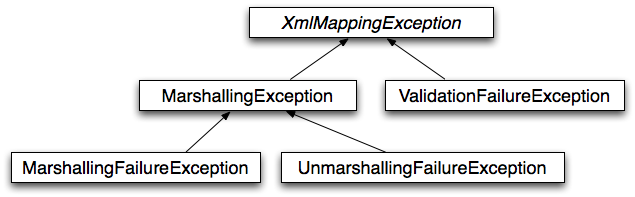
使用 Marshaller 和 Unmarshaller
您可以在各種情況下使用Spring的OXM。在下面的示例中,我們使用它將Spring管理應用程式的設定排程為一個XML檔案。在下面的示例中,我們使用一個簡單的JavaBean來表示設定:
-
Java
-
Kotlin
public class Settings {

	private boolean fooEnabled;

	public boolean isFooEnabled() {
		return fooEnabled;
	}

	public void setFooEnabled(boolean fooEnabled) {
		this.fooEnabled = fooEnabled;
	}
}
class Settings {
var isFooEnabled: Boolean = false
}應用程式類使用此bean來儲存其設定。除了一個主方法外,該類還有兩個方法:saveSettings()將設定bean儲存到名為settings.xml的檔案中,loadSettings()再次載入這些設定。以下main()方法構造一個Spring應用程式上下文並呼叫這兩個方法:
-
Java
-
Kotlin
import java.io.FileInputStream;
import java.io.FileOutputStream;
import java.io.IOException;
import javax.xml.transform.stream.StreamResult;
import javax.xml.transform.stream.StreamSource;
import org.springframework.context.ApplicationContext;
import org.springframework.context.support.ClassPathXmlApplicationContext;
import org.springframework.oxm.Marshaller;
import org.springframework.oxm.Unmarshaller;

public class Application {

	private static final String FILE_NAME = "settings.xml";
	private Settings settings = new Settings();
	private Marshaller marshaller;
	private Unmarshaller unmarshaller;

	public void setMarshaller(Marshaller marshaller) {
		this.marshaller = marshaller;
	}

	public void setUnmarshaller(Unmarshaller unmarshaller) {
		this.unmarshaller = unmarshaller;
	}

	public void saveSettings() throws IOException {
		try (FileOutputStream os = new FileOutputStream(FILE_NAME)) {
			this.marshaller.marshal(settings, new StreamResult(os));
		}
	}

	public void loadSettings() throws IOException {
		try (FileInputStream is = new FileInputStream(FILE_NAME)) {
			this.settings = (Settings) this.unmarshaller.unmarshal(new StreamSource(is));
		}
	}

	public static void main(String[] args) throws IOException {
		ApplicationContext appContext =
				new ClassPathXmlApplicationContext("applicationContext.xml");
		Application application = (Application) appContext.getBean("application");
		application.saveSettings();
		application.loadSettings();
	}
}
class Application {
lateinit var marshaller: Marshaller
lateinit var unmarshaller: Unmarshaller
fun saveSettings() {
FileOutputStream(FILE_NAME).use { outputStream -> marshaller.marshal(settings, StreamResult(outputStream)) }
}
fun loadSettings() {
FileInputStream(FILE_NAME).use { inputStream -> settings = unmarshaller.unmarshal(StreamSource(inputStream)) as Settings }
}
}
private const val FILE_NAME = "settings.xml"
fun main(args: Array<String>) {
val appContext = ClassPathXmlApplicationContext("applicationContext.xml")
val application = appContext.getBean("application") as Application
application.saveSettings()
application.loadSettings()
}Application需要設定marshaller和unmarshaller屬性。我們可以透過使用以下applicationContext.xml來實現:
<beans>
	<bean id="application" class="Application">
		<property name="marshaller" ref="xstreamMarshaller" />
		<property name="unmarshaller" ref="xstreamMarshaller" />
	</bean>
	<bean id="xstreamMarshaller" class="org.springframework.oxm.xstream.XStreamMarshaller"/>
</beans>此應用程式上下文使用XStream,但我們也可以使用本章後面描述的任何其他排程器例項。請注意,預設情況下,XStream不需要任何進一步配置,因此bean定義相當簡單。另請注意,XStreamMarshaller同時實現了Marshaller和Unmarshaller,因此我們可以在應用程式的marshaller和unmarshaller屬性中引用xstreamMarshaller bean。
此示例應用程式生成以下settings.xml檔案:
<?xml version="1.0" encoding="UTF-8"?>
<settings foo-enabled="false"/>
XML配置名稱空間
您可以使用OXM名稱空間中的標籤更簡潔地配置排程器。為了使這些標籤可用,您必須首先在XML配置檔案的前言中引用相應的schema。以下示例展示瞭如何實現:
<?xml version="1.0" encoding="UTF-8"?>
<beans xmlns="http://www.springframework.org/schema/beans"
	xmlns:xsi="http://www.w3.org/2001/XMLSchema-instance"
	xmlns:oxm="http://www.springframework.org/schema/oxm" (1)
	xsi:schemaLocation="http://www.springframework.org/schema/beans
		https://www.springframework.org/schema/beans/spring-beans.xsd
		http://www.springframework.org/schema/oxm
https://www.springframework.org/schema/oxm/spring-oxm.xsd"> (2)| 1 | 引用oxm schema。 |
| 2 | 指定oxm schema位置。 |
該schema提供以下元素:
每個標籤都在其各自的排程器部分進行解釋。例如,JAXB2排程器的配置可能類似於以下內容:
<oxm:jaxb2-marshaller id="marshaller" contextPath="org.springframework.ws.samples.airline.schema"/>JAXB
JAXB繫結編譯器將W3C XML Schema轉換為一個或多個Java類、一個jaxb.properties檔案以及可能的某些資原始檔。JAXB還提供了一種從帶註解的Java類生成schema的方法。
Spring支援JAXB 2.0 API作為XML排程策略,遵循Marshaller 和 Unmarshaller中描述的Marshaller和Unmarshaller介面。相應的整合類位於org.springframework.oxm.jaxb包中。
使用 Jaxb2Marshaller
Jaxb2Marshaller 類實現了Spring的Marshaller和Unmarshaller介面。它需要一個上下文路徑才能執行。您可以透過設定contextPath屬性來設定上下文路徑。上下文路徑是一個由冒號分隔的Java包名列表,這些包名包含由schema派生出來的類。它還提供了一個classesToBeBound屬性,允許您設定一個由排程器支援的類陣列。透過為bean指定一個或多個schema資源來執行schema驗證,如下例所示:
<beans>
	<bean id="jaxb2Marshaller" class="org.springframework.oxm.jaxb.Jaxb2Marshaller">
		<property name="classesToBeBound">
			<list>
				<value>org.springframework.oxm.jaxb.Flight</value>
				<value>org.springframework.oxm.jaxb.Flights</value>
			</list>
		</property>
		<property name="schema" value="classpath:org/springframework/oxm/schema.xsd"/>
	</bean>

	...

</beans>
XML配置名稱空間
jaxb2-marshaller元素配置一個org.springframework.oxm.jaxb.Jaxb2Marshaller,如下例所示:
<oxm:jaxb2-marshaller id="marshaller" contextPath="org.springframework.ws.samples.airline.schema"/>或者,您可以使用class-to-be-bound子元素向排程器提供要繫結的類列表:
<oxm:jaxb2-marshaller id="marshaller">
	<oxm:class-to-be-bound name="org.springframework.ws.samples.airline.schema.Airport"/>
	<oxm:class-to-be-bound name="org.springframework.ws.samples.airline.schema.Flight"/>
	...
</oxm:jaxb2-marshaller>
下表描述了可用屬性:
| 屬性 | 描述 | 必需 |
|---|---|---|
|
排程器的ID |
否 |
|
JAXB上下文路徑 |
否 |
JiBX
JiBX框架提供了一種類似於Hibernate為ORM提供的解決方案:繫結定義定義了Java物件如何轉換為XML或從XML轉換的規則。在準備繫結和編譯類之後,JiBX繫結編譯器會增強類檔案並新增程式碼來處理類例項與XML之間的轉換。
有關JiBX的更多資訊,請參閱JiBX網站。Spring整合類位於org.springframework.oxm.jibx包中。
使用 JibxMarshaller
JibxMarshaller類實現了Marshaller和Unmarshaller介面。要操作,它需要排程類的名稱,您可以使用targetClass屬性設定。可選地,您可以透過設定bindingName屬性來設定繫結名稱。在以下示例中,我們繫結Flights類:
<beans>
	<bean id="jibxFlightsMarshaller" class="org.springframework.oxm.jibx.JibxMarshaller">
		<property name="targetClass">org.springframework.oxm.jibx.Flights</property>
	</bean>
	...
</beans>JibxMarshaller是為單個類配置的。如果您想排程多個類,您必須配置多個具有不同targetClass屬性值的JibxMarshaller例項。
XStream
XStream是一個簡單的庫,用於將物件序列化為XML並再次反序列化。它不需要任何對映並生成乾淨的XML。
有關XStream的更多資訊,請參閱XStream網站。Spring整合類位於org.springframework.oxm.xstream包中。
使用 XStreamMarshaller
XStreamMarshaller不需要任何配置,可以直接在應用程式上下文中配置。要進一步自定義XML,您可以設定一個別名對映,該對映由字串別名對映到類組成,如下例所示:
<beans>
	<bean id="xstreamMarshaller" class="org.springframework.oxm.xstream.XStreamMarshaller">
		<property name="aliases">
			<props>
				<prop key="Flight">org.springframework.oxm.xstream.Flight</prop>
			</props>
		</property>
	</bean>
	...
</beans>|
預設情況下,XStream允許任意類被解排程,這可能導致不安全的Java序列化效應。因此,我們不建議使用 如果您選擇使用 這樣做可以確保只有註冊的類才能進行解排程。 此外,您可以註冊自定義轉換器,以確保只有您支援的類才能被解排程。您可能希望將 |
| 請注意,XStream是一個XML序列化庫,而不是一個數據繫結庫。因此,它的名稱空間支援有限。因此,它不適合在Web服務中使用。 |

